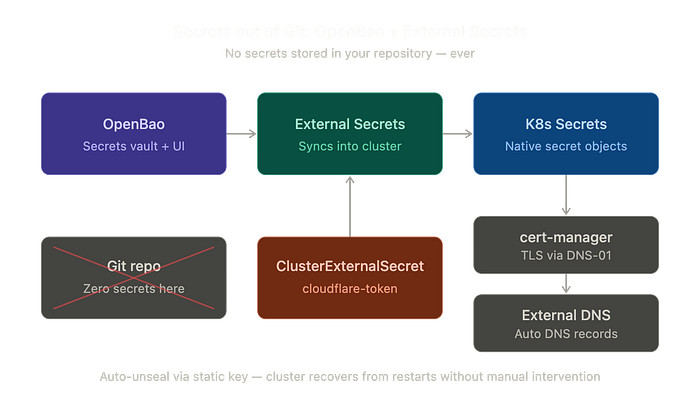

Kubermatic just released SecureGuard — an open-source secrets management platform built on OpenBao and External Secrets Operator. I spent the last two days setting up exactly this stack on my own FluxCD-managed cluster. Here's a practical walkthrough of the full setup, including every gotcha I ran into.
The Problem
Kubernetes Secrets are base64-encoded — not encrypted. Anyone with cluster access can decode them. If you're running GitOps, you have two options: encrypt secrets before they land in Git, or keep them out of Git entirely.
Sealed Secrets takes the first approach — it encrypts secrets per-cluster and stores the ciphertext in your repo. Works fine, but managing dozens of secrets means dozens of sealed files in Git, and rotating or updating them isn't exactly fun.
OpenBao + External Secrets takes the second approach: secrets live in a central vault with a UI, completely outside of Git. External Secrets Operator watches OpenBao and syncs secrets into Kubernetes at runtime. You add or update a secret in one place, and ESO handles the rest.
Why OpenBao?
OpenBao is the open-source fork of HashiCorp Vault. When HashiCorp moved Vault to a Business Source License (BSL) in 2023, the community forked it under the Linux Foundation. If you've used Vault before, OpenBao feels identical — same API, same concepts, same workflow. The difference is the license: MPL 2.0, no strings attached.
I actually went through the full evolution on this cluster: started with HashiCorp Vault, switched to Sealed Secrets when the license changed, and eventually landed on OpenBao + External Secrets. Each step taught me something, but this setup won in the end because day-to-day management is just simpler.
The Architecture
The flow is straightforward:
- OpenBao holds all secrets — API tokens, database passwords, everything
- External Secrets Operator reads from OpenBao and creates native Kubernetes Secrets
- Your workloads consume standard K8s Secrets — they don't know or care where they came from
This means your application manifests stay clean. No sealed secret files, no SOPS-encrypted values, no secret references in your Git repo at all.
Setting up OpenBao on Kubernetes
This guide assumes OpenBao and External Secrets Operator are already deployed on your cluster. I won't cover the Helm installation itself — that's standard and well-documented. You can find the full manifests in my repo: https://github.com/dmuiX/fluxcd.k8sdev.cloud.
What isn't well-documented is everything that comes after.
OpenBao runs as a 3-replica StatefulSet using Raft for consensus. The Helm chart handles most of this, but the configuration has some sharp edges.
Auto-Unseal with a Static Key
By default, Vault/OpenBao uses Shamir's Secret Sharing for unsealing — you need to manually provide key shares every time a pod restarts. That's fine for a production vault with an ops team, but for a homelab or small team, auto-unseal is essential.
OpenBao supports a seal "static" configuration that uses a pre-generated key for automatic unsealing. The cluster recovers from restarts without any manual intervention.
Step 1: Generate the static key and store it as a Kubernetes Secret
static_key=$(openssl rand -base64 32 | tee /dev/tty)

kubectl create secret generic openbao-unseal-key \
  -n openbao \
  --from-literal=unseal-key="${static_key}" \
  --dry-run=client -o yaml | kubectl apply -f -
This key must exist before you initialize OpenBao. Back it up — without it, your cluster can't unseal.
Step 2: Initialize the cluster
kubectl exec -n openbao openbao-0 -- bao operator init \
  -recovery-shares=1 \
  -recovery-threshold=1 | tee openbao-keys.txt
With seal "static" active, this produces a recovery key (not unseal keys). The recovery key is for emergency operations only — normal unsealing happens automatically via the static key.
After init, the leader unseals itself. Other nodes auto-join via retry_join and auto-unseal as well. No manual steps needed.
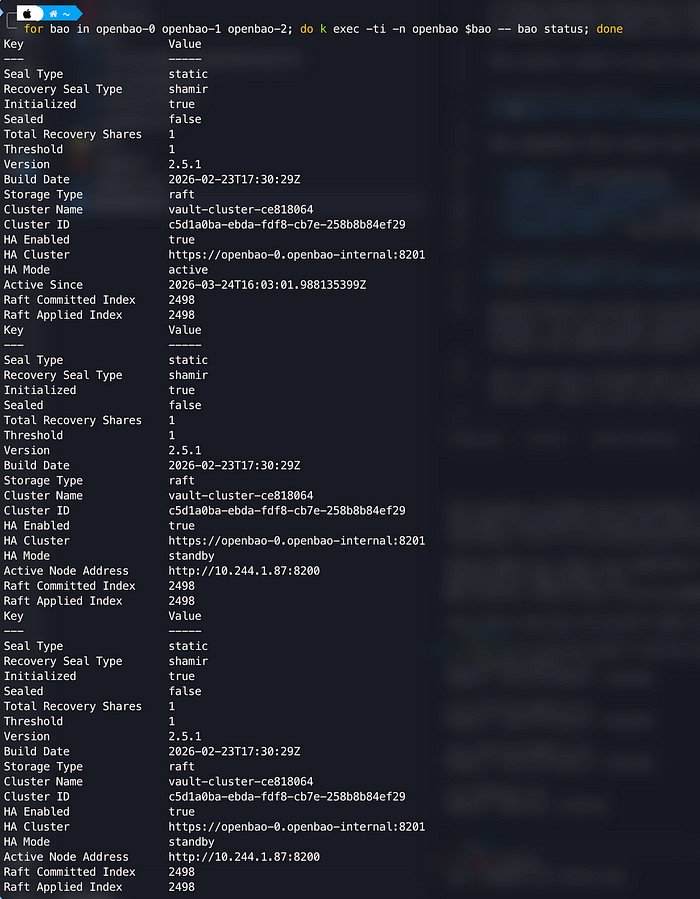
Step 3: Verify all nodes are running
kubectl exec -n openbao openbao-0 -- bao status
kubectl exec -n openbao openbao-1 -- bao status
kubectl exec -n openbao openbao-2 -- bao status
All three should show Sealed: false.
Step 4: Check raft peers (root Token Required)
BAO_TOKEN=<root-token-here>
kubectl exec -n openbao openbao-0 -- sh -c "BAO_TOKEN=$BAO_TOKEN bao operator raft list-peers"
Understanding the Three Keys
The init process produces three different keys that serve very different purposes. This confused me at first, so here's the breakdown:
Static Key — the auto-unseal key you generated in step 1 with openssl rand. This is the key that encrypts OpenBao's master key. OpenBao reads it on every start via the seal "static" config block — this is what makes auto-unseal work. Without it, your cluster can't start. Back it up in a password manager.
Recovery Key — generated by OpenBao during bao operator init. This is an emergency-only key. If you lose your root token, the recovery key lets you generate a new one. It does not unseal anything. Also back it up, but you'll rarely need it.
Root Token — also generated during init. This is your admin access to the OpenBao API and UI. Use it for initial setup (enabling auth methods, creating policies). In a production environment you'd revoke it after setup and use proper auth methods instead — but for a homelab, keeping it around is fine.
The important thing to understand: with seal "static", Shamir unseal keys don't exist. The static key replaces them entirely. That's the whole point — no manual unsealing, ever.
Connecting External Secrets
Once OpenBao is running, you need to let External Secrets Operator authenticate against it. The cleanest way is Kubernetes auth — ESO uses its ServiceAccount to authenticate, no static tokens involved.
In OpenBao:
- Enable a KV secret engine (name it
kv) - Create an ACL policy that grants read access:
path "kv/data/*" {
    capabilities = ["read", "list"]
}
path "kv/metadata/*" {
    capabilities = ["list"]
}- Enable the Kubernetes auth method and create a role that binds ESO's ServiceAccount to that policy
In your cluster:
Deploy a ClusterSecretStore that points to OpenBao and uses Kubernetes auth. From here, any ExternalSecret resource you create will automatically pull its values from OpenBao and create a native Kubernetes Secret.
A Real Example: Cloudflare API Token
Theory is nice, but here's what this actually looks like in practice. Both cert-manager (for TLS certificates via DNS-01 challenge) and External DNS (for automatic DNS records) need a Cloudflare API token. Instead of creating that secret manually in each namespace, you define it once in OpenBao and let ESO distribute it:
apiVersion: external-secrets.io/v1
kind: ClusterExternalSecret
metadata:
  name: cloudflare-token
spec:
  refreshTime: 24h                    # how often ESO checks OpenBao for changes
  externalSecretName: "cloudflare-token"
  externalSecretSpec:
    target:
      name: cloudflare-token          # name of the K8s Secret that gets created
    data:
      - secretKey: token              # key inside the K8s Secret
        remoteRef:
          key: cloudflare-token       # path in OpenBao's KV store
          version: v1
          property: token             # field within the OpenBao secret
          decodingStrategy: None
    secretStoreRef:
      kind: ClusterSecretStore
      name: openbao-backend           # references your ClusterSecretStore
  namespaceSelectors:                 # which namespaces get this secret
    - matchExpressions:
        - key: kubernetes.io/metadata.name
          operator: In
          values:
            - cert-manager
            - external-dns
What's happening here:
ClusterExternalSecret(not justExternalSecret) — this is the cluster-wide variant. It creates anExternalSecretin each matching namespace automatically.remoteRefpoints to the secret in OpenBao: thekeyis the path in the KV engine,propertyis the specific field within that secret.target.nameis what the resulting Kubernetes Secret will be called — this is what cert-manager and External DNS reference in their configs.namespaceSelectorscontrols which namespaces receive the secret. Only cert-manager and external-dns need this token, so only they get it. Least privilege by default.refreshTime: 24hmeans ESO checks OpenBao every 24 hours. Rotate the token in OpenBao's UI, and within a day it's updated everywhere — no Git commit, no redeployment.
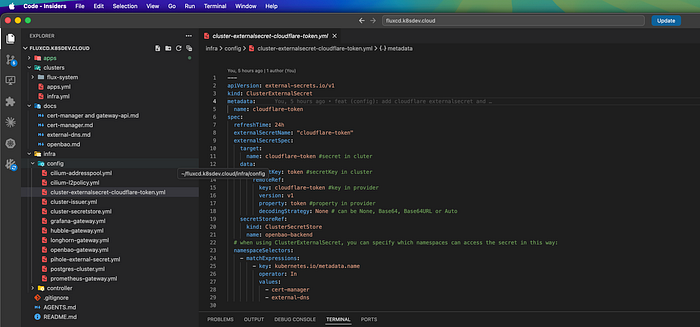
This is where the approach really pays off: one secret in OpenBao, automatically synced to exactly the namespaces that need it. Add a new service that needs the token? Add its namespace to the selector. Rotate the token? Update it in one place.
The Gotchas
Setting up OpenBao on Kubernetes has more sharp edges than you'd expect. Here's everything that broke and why.
ha.config vs ha.raft.config
When ha.raft.enabled: true in the Helm values, the chart uses ha.raft.config — not ha.config. Put your configuration in the wrong block and the Helm chart silently renders a default ConfigMap. No error, no warning. Always verify the rendered ConfigMap matches what you expect.
Don't pass the unseal key as an environment variable
extraSecretEnvironmentVars looks like the right place to inject the static key. It's not. OpenBao won't start. The key needs to be mounted as a volume instead.
HTTP vs HTTPS mismatch on retry_join
If tls_disable = 1 is set in your listener config, the retry_join addresses must use http://, not https://. Get this wrong and you'll see: "http: server gave HTTP response to HTTPS client" — a confusing error when you're debugging why raft peers won't join.
Sealed nodes don't listen on port 8201
The Raft cluster port (8201) only opens after a node is unsealed. A sealed node shows port 8200 (API) as open but 8201 (cluster) as closed. This causes "failed to make requestVote RPC: connection refused" between nodes and can be very confusing during initial setup.
Raft needs 3 replicas minimum
2 replicas means no fault tolerance — if one node goes down, quorum is lost and the entire cluster locks up. Always use 3 (or 5). The Helm chart defaults to 3, don't override to 2.
The UI service round-robins unseal requests
If you ever need to manually unseal (e.g., during initial debugging), don't use the UI — the service sends requests to random pods. Use kubectl exec targeting specific pods instead.
jq and base64 gotchas
The static key is double base64-encoded in Kubernetes (once by openssl, once by K8s). And jq needs -r for raw output and quoted keys for names with hyphens:
bash
# This works:
kubectl get secret openbao-unseal-key -n openbao -o json \
  | jq -r '.data."unseal-key"' | base64 -d
What I Learned
This is my third iteration of secrets management on this cluster. HashiCorp Vault → Sealed Secrets → OpenBao + External Secrets. Each approach works, but they optimize for different things.
If you want minimal setup complexity: Sealed Secrets. Encrypt, commit, done.
If you want a central UI, easy rotation, and secrets completely outside Git: OpenBao + External Secrets. More setup upfront, but simpler to operate long-term.
The fact that Kubermatic is now packaging this exact stack as a product (SecureGuard) tells me the community is converging on this pattern. The components are mature — the documentation just needs to catch up.
Full setup with all manifests is on my GitHub: 🔗 https://github.com/dmuiX/fluxcd.k8sdev.cloud
—
I'm a freelance infrastructure engineer. Most of my work is Docker Compose — simple, stable setups that clients can run on their own. When a project actually needs high availability and scalability, I bring in Kubernetes. The right tool for the job, not the most complex one. Feel free to reach out.