
Disclosure: I used AI tools to help refine and structure this content. The insights and code examples are from my direct work experience or my own research and investigational work.
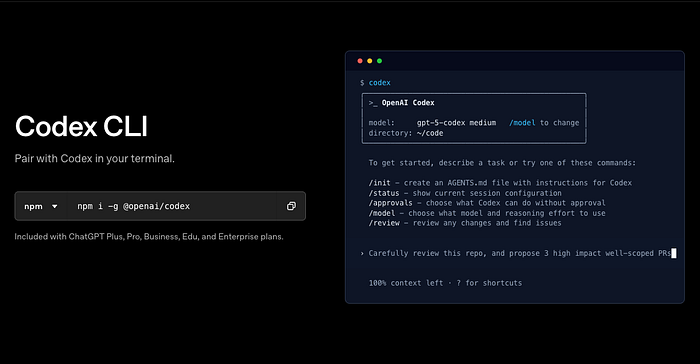
Two months ago, my team also migrated OpenAI Codex CLI into our daily agentic coding workflow. The installation took 4 hours — Node version conflicts, Ubuntu keyring failures, Windows WSL crashes. Every error message felt like a test.
The payoff? We're now running 7-hour refactors that migrate 200+ files overnight, multi-agent security pipelines that catch SQL injection before code review, and automated CI checks that block vulnerable PRs.
This isn't another "npm install and you're done" tutorial. This is the battle-tested guide: from fixing broken installs to building production-grade multi-agent systems.
What you'll build:
- Working Codex CLI installation (all platforms, all errors solved)
- AGENTS.md-powered custom workflows that know your project
- MCP-integrated external tools (databases, Slack, Jira)
- Production-ready multi-agent orchestration
Prerequisites:
- Node.js 18+ (we'll fix version conflicts if you have them)
- Basic terminal comfort (cd, ls, npm)
- ChatGPT Plus/Pro OR OpenAI API key
- Git-tracked project (safety requirement)
Let's start where everyone gets stuck.
OpenAI Codex CLI Installation: Troubleshooting All Platforms
The official docs say "npm install -g @openai/codex" and move on. In reality, 60% of first-time installs fail. Here's how to get it working on every platform.
Pre-flight Checks
Before touching npm, verify your environment:
# Check Node version (must be 18-22)
node -v

# If it shows v16 or v12, you have problems
# Fix: Use NVM to switch versions
nvm install 20
nvm use 20
# Verify Git is initialized
git status
# If "not a git repository" → run: git init
# Windows users: Confirm you're in WSL2
wsl --status
# If not installed: wsl --install -d Ubuntu-22.04
Why this matters: Codex requires Node 18+ (Rust binary compatibility), Git for safety (rollback broken changes), and WSL2 on Windows (native support experimental).
Platform-Specific Installation
macOS (Recommended: Homebrew)
# Cleanest install path
brew install --cask codex

# Verify
codex --version  # Should show 0.58.0 or newer
Linux (Ubuntu/Debian)
Node version conflicts are the #1 Linux issue. Fix it first:
# Remove old Node if present
sudo apt purge -y nodejs npm
sudo apt autoremove -y

# Install Node 20 from NodeSource
curl -fsSL https://deb.nodesource.com/setup_20.x | sudo -E bash -
sudo apt install -y nodejs build-essential
# Verify
node -v  # Should show v20.x.x
# Install Codex
npm install -g @openai/codex
Windows (WSL2 Required)
Windows support is experimental. WSL2 is mandatory:
# From PowerShell (admin)
wsl --install -d Ubuntu-22.04

# Inside WSL Ubuntu terminal
curl -fsSL https://deb.nodesource.com/setup_20.x | sudo -E bash -
sudo apt install -y nodejs build-essential git
npm install -g @openai/codex
Known WSL issue: Chrome OAuth freezing during authentication.
Fix:
# Launch Chrome without GPU acceleration
google-chrome --disable-gpu --disable-features=UseOzonePlatform
Authentication (Two Paths)
Path A: ChatGPT OAuth (Easiest — recommended for most)
codex
# Terminal shows: "Sign in with ChatGPT" or "Provide API key"
# Select: Sign in with ChatGPT
# Browser opens → authorize with OpenAI account
# Done. Credits auto-applied ($5 for Plus, $50 for Pro)
Path B: API Key (For CI/CD or custom billing)
# Get API key from: https://platform.openai.com/api-keys
export OPENAI_API_KEY="sk-proj-abc123..."

# Make permanent
echo 'export OPENAI_API_KEY="sk-proj-abc123..."' >> ~/.zshrc
source ~/.zshrc
# Launch Codex
codex
# Select: Provide API key
Verification Test
# Test with safest approval mode
codex "echo 'Hello from Codex'" --ask-for-approval suggest

# Should show:
# 1. Codex explains plan
# 2. Asks permission to run command
# 3. Executes after you type 'y'
Troubleshooting Matrix
Issue Symptom Fix Node v16 conflict "Version not supported" nvm use 20 or reinstall Node 20 Chrome freezing (Linux) OAuth window hangs Launch with: google-chrome --disable-gpu Keyring mismatch (Ubuntu) "Failed to unlock keyring" mv ~/.local/share/keyrings/login.keyring login.keyring.bak then reboot WSL network issues "Cannot connect to API" Check .wslconfig, restart WSL: wsl --shutdown npm permission errors "EACCES" during install Use sudo npm install -g @openai/codex (Linux only)
Still stuck? Check GitHub Issues: https://github.com/openai/codex/issues (6,771 open issues — yours is probably documented).
Codex CLI Approval Modes: Production Guide
Installation working? Now comes the decision that affects everything: which approval mode to use. Choose wrong, and you'll either waste time approving trivial edits or watch Codex break production code unchecked.
The Three Modes (Real Use Cases)
Suggest Mode (Default — Safest)
Asks before EVERY action: reading files, editing files, running commands.
When to use: Debugging production issues, exploring unfamiliar codebases, first time using Codex on a project.
Real scenario:
codex --ask-for-approval suggest "Find and fix authentication token expiry bug in Express middleware"

# Codex behavior:
# 1. "I want to read src/middleware/auth.js. Allow? (y/n)"
# 2. Shows analysis: "Token validation uses client timestamp, should use server UTC"
# 3. "I want to edit auth.js to fix this. Allow? (y/n)"
# 4. "I want to run npm test to verify. Allow? (y/n)"
# You approve each step, maintaining full control
Auto Edit Mode (Productivity Sweet Spot)
Automatically creates and edits files. Asks before running commands.
When to use: Daily feature development, refactoring known codebases, non-critical changes.
Real scenario:
codex --ask-for-approval auto-edit "Add comprehensive error handling with retries to all Express API routes"

# Codex behavior:
# 1. Reads 15 route files (no asking)
# 2. Edits all files, adds try-catch with exponential backoff (no asking)
# 3. Shows summary: "Modified 15 files, added 180 lines"
# 4. "I want to run npm test. Allow? (y/n)"
# You review changes via git diff, approve test run
Full Auto Mode (Sandboxed Autonomy)
Does everything without asking. Network disabled, sandboxed to workspace.
When to use: Long-running tasks (multi-hour refactors), test generation, migrations with 100+ files.
Real scenario:
codex --ask-for-approval full-auto --sandbox workspace-write \
  "Generate comprehensive Jest test suite for all utility functions in /src/utils. Target: 90% coverage minimum."# Codex behavior:
# Runs for 2 hours
# Generates 127 test files
# Runs test suite automatically
# Shows final report: "Coverage: 94.2%, 1,247 tests passing"
# You review results at end via: git diff --stat
Sandbox Policies (Safety Nets)
Even Full Auto mode has guardrails:
# Test the sandbox
codex --sandbox workspace-write --ask-for-approval full-auto \
  "Try to curl google.com and save the response"

# Result: "Network access denied by sandbox policy"
Sandbox types:
workspace-write(default): Writes only to current directory, network blockednone(⚠️ dangerous): No restrictions, only use in CI/CD containers
Platform sandboxing:
- macOS: Apple Seatbelt (kernel-level)
- Linux: Landlock (filesystem isolation)
- Windows WSL: Limited (experimental)
AGENTS.md — Your Custom Codex Brain
Codex doesn't know your project conventions, coding standards, or team practices. AGENTS.md teaches it.
What Is AGENTS.md?
Project-specific instructions file that Codex reads automatically. Think "system prompt for your codebase."
Creating Your First AGENTS.md
# Inside your project directory
codex --init

# Creates: AGENTS.md with template
Real-World Pattern (Node.js API Project)
Here's the AGENTS.md from our production API:
# Project Context
Node.js/Express REST API with PostgreSQL. TypeScript strict mode, ESLint Airbnb config, Jest for testing.

## Architecture
- `/src/routes` - Express route handlers (thin layer)
- `/src/services` - Business logic (pure functions, fully tested)
- `/src/models` - Sequelize ORM models
- `/src/middleware` - Auth (JWT), validation (Joi), error handling
## Coding Standards
1. **Error Handling**: Use try-catch with custom AppError class. Never throw raw errors.
2. **Async**: Always async/await, never callbacks or Promises.then()
3. **Testing**: Minimum 80% coverage. Integration tests for all routes.
4. **Security**: Helmet enabled, rate limiting (5 req/min on auth), input validation with Joi
5. **Logging**: Use `logger.info()` not `console.log()`. Include request IDs.
## Commands
- Run tests: `npm test`
- Run dev server: `npm run dev`
- Database migrations: `npx sequelize-cli db:migrate`
- Lint: `npm run lint`
## Conventions
- API responses: `{ success: boolean, data: any, error?: string }`
- Environment variables via `.env` (never hardcode secrets)
- Database queries: use parameterized queries (SQL injection prevention)
## Non-Goals
- Don't refactor working code unless explicitly requested
- Don't add new dependencies without approval
- Don't remove console.logs from test files (debugging aid)
Advanced AGENTS.md Patterns
Security Review Mode:
## Code Review Checklist
When reviewing code, prioritize:
1. **SQL injection**: All queries must use parameterized statements
2. **XSS vulnerabilities**: Sanitize user input with validator.js
3. **Authentication bypass**: Verify middleware order (auth before business logic)
4. **Rate limiting**: Public endpoints must have rate limits
5. **Sensitive data**: No API keys, passwords, tokens in code
Multi-Language Projects:
## Language-Specific Rules

### Python
- Black formatting (line length 100)
- Type hints required for all function signatures
- pytest fixtures for database tests
### TypeScript
- Strict mode enabled
- No `any` types (use `unknown` or proper types)
- Prefer `interface` over `type` for object shapes
### Go
- gofmt formatting (no exceptions)
- Table-driven tests
- Error wrapping with fmt.Errorf
Testing Your AGENTS.md
codex "Add a new user registration endpoint"

# Check if Codex followed your rules:
# ✓ Uses try-catch with AppError?
# ✓ Joi validation present?
# ✓ logger.info() instead of console.log?
# ✓ Integration test included?
If Codex ignores rules, make them more explicit: "ALWAYS use try-catch" instead of "Use try-catch."
Slash Commands — Built-in Superpowers
Typing the same prompts repeatedly? Slash commands save hours.
Essential Built-in Commands
/review — Dedicated Code Review Agent
# Inside Codex session
/review

# Options:
# 1. Review against base branch (compare feature vs main)
# 2. Review uncommitted changes (staged + unstaged)
# 3. Review specific commit (SHA)
# 4. Custom review instructions
# Example: Security-focused review
/review → 4 → "Focus on SQL injection vulnerabilities and XSS risks"
# Codex launches separate reviewer agent
# Shows prioritized findings: CRITICAL, HIGH, MEDIUM, LOW
# No files modified (read-only analysis)
/model — Switch Models Mid-Session
/model

# Options:
# - gpt-5-codex (default, balanced performance/quality)
# - gpt-5-codex-mini (4x more usage, faster, less capable)
# - gpt-5.1-codex (latest, highest quality, slower)
# Reasoning effort:
# - low (quick tasks, simple edits)
# - medium (default, most tasks)
# - high (architectural decisions, complex refactors)
# Switch on the fly
/model → gpt-5-codex-mini → Set reasoning: low
When to switch:
- Hit 90% of 5-hour quota → switch to mini
- Complex architectural decision → switch to 5.1-codex with high reasoning
- Simple file edits → stick with default
/status — Session Information
/status

# Shows:
# Model: gpt-5-codex
# Directory: /Users/dev/my-api
# Approval mode: auto-edit
# Sandbox: workspace-write
# Session time: 47 minutes
# Usage: 1.2 hours of 5-hour quota
Creating Custom Slash Commands
Location: ~/.codex/prompts/
Example: API Test Generator
Create ~/.codex/prompts/api-test.md:
---
name: api-test
description: Generate integration tests for API endpoint
---
Generate comprehensive Jest integration test for {{endpoint_path}}.
Required test cases:
1. Success (200) with valid input
2. Validation error (400) with invalid/missing fields
3. Unauthorized (401) without authentication token
4. Server error (500) with database failure mock
Use supertest for HTTP assertions.
Mock database calls with jest.mock().
Test coverage: 100% of route handler logic.
Usage:
codex
> /api-test endpoint_path=/api/users

# Codex generates complete test file:
# - All 4 test cases
# - Database mocks
# - Supertest setup
# - Saves to: __tests__/api/users.test.js
Sharing Custom Commands (Team Distribution):
# Export your prompts
tar -czf team-prompts.tar.gz ~/.codex/prompts/

# Team member imports
tar -xzf team-prompts.tar.gz -C ~/
# Now whole team has same custom commands
MCP Integration — Connect External Tools
Slash commands handle repetitive tasks. But what if Codex needs to access your database, query Jira, or post to Slack? That's where MCP transforms Codex from a code assistant into an infrastructure-aware agent.
What Is MCP?
Model Context Protocol — lets Codex use external tools (databases, APIs, services) as native capabilities.
Example: Instead of describing your database schema, Codex queries it directly.
MCP Setup (PostgreSQL Example)
Install MCP PostgreSQL Server:
npm install -g @modelcontextprotocol/server-postgresConfigure in ~/.codex/config.toml:
[[mcp_servers]]
name = "postgres"
command = "mcp-server-postgres"
args = ["postgresql://user:pass@localhost:5432/mydb"]
env = { DATABASE_URL = "postgresql://user:pass@localhost:5432/mydb" }
Verify Connection:
codex mcp list

# Output:
# Connected MCP Servers:
# - postgres (status: active, tools: 3)
Use in Codex:
codex "Query the users table for all accounts created in the last 7 days. Show email, created_at, and account_type. Order by created_at descending."

# Codex now has postgres tool access
# Generates SQL query:
# SELECT email, created_at, account_type
# FROM users
# WHERE created_at > NOW() - INTERVAL '7 days'
# ORDER BY created_at DESC;
#
# Executes query, returns formatted resultsReal-World MCP Use Cases
Case 1: Slack Integration
[[mcp_servers]]
name = "slack"
command = "mcp-server-slack"
args = ["--token", "$SLACK_BOT_TOKEN"]
env = { SLACK_BOT_TOKEN = "xoxb-your-token" }
Usage:
codex "Summarize today's git commits and post to #engineering channel"

# Codex:
# 1. Runs: git log --since=midnight --oneline
# 2. Generates summary
# 3. Posts to Slack via MCP
Case 2: Jira Ticket Management
[[mcp_servers]]
name = "jira"
command = "mcp-server-jira"
args = ["--domain", "mycompany.atlassian.net"]
env = { JIRA_TOKEN = "your-api-token" }
Usage:
codex "Create Jira ticket: Bug - Login timeout after 5 minutes idle. Priority: High. Assign to me."MCP Security Considerations
Never:
- Store API tokens directly in config.toml (use env vars:
$TOKEN_NAME) - Give write access to production databases (use read-only replicas)
- Enable MCP in Full Auto mode without extensive testing
Always:
- Use environment variables for secrets
- Test MCP servers in staging first
- Review MCP logs regularly:
~/.codex/logs/mcp.log - Use read-only database users when possible
Multi-Agent Orchestration with OpenAI Codex CLI
Multi-agent orchestration solves complex pipelines. But how does this translate to daily work? Most tasks need one agent. Some need a team.
When to Use Multi-Agent
Single agent handles:
- Bug fixes
- Feature additions (<20 files)
- Code reviews
- Refactors (simple)
Multi-agent shines when:
- Full-stack features (frontend + backend + tests + docs)
- Large migrations (>100 files across multiple systems)
- Pipeline workflows (review → fix → test → deploy)
Agents SDK Setup
npm install @openai/agents-sdk dotenvInitialize Codex as MCP Server:
# Terminal 1: Start Codex MCP server
npx codex mcp

# Terminal 2: Your agent code connects to it
Practical Example: 3-Agent Security Pipeline
Goal: Automated security review → auto-fix issues → generate security tests
Create security_pipeline.py:
import asyncio
import os
from dotenv import load_dotenv
from agents import Agent, Runner
from agents.mcp import MCPServerStdio


load_dotenv()
async def main():
    # Connect to Codex MCP server
    async with MCPServerStdio(
        name="Codex",
        params={"command": "npx", "args": ["-y", "codex", "mcp"]},
        client_session_timeout_seconds=3600
    ) as codex_mcp:

        # Agent 1: Security Reviewer
        security_agent = Agent(
            name="SecurityReviewer",
            instructions=(
                "Review code for security vulnerabilities:\n"
                "1. SQL injection (check for parameterized queries)\n"
                "2. XSS risks (input sanitization)\n"
                "3. Authentication bypass (middleware order)\n"
                "4. Sensitive data exposure (API keys, tokens)\n\n"
                "Output JSON: { issues: [...], severity: 'critical|high|medium|low' }"
            ),
            model="gpt-5-codex"
        )

        # Agent 2: Code Fixer
        fixer_agent = Agent(
            name="SecurityFixer",
            instructions=(
                "Fix security issues identified by SecurityReviewer.\n"
                "Make minimal, targeted changes.\n"
                "Add comments explaining each fix.\n"
                "Return: list of modified files with explanations."
            ),
            model="gpt-5-codex",
            handoffs=[security_agent]  # Can consult reviewer if needed
        )

        # Agent 3: Test Generator
        test_agent = Agent(
            name="SecurityTestGenerator",
            instructions=(
                "Generate security tests for all fixes.\n"
                "Test cases:\n"
                "- Attack vectors (SQL injection attempts, XSS payloads)\n"
                "- Valid inputs (ensure fixes don't break functionality)\n"
                "- Edge cases\n\n"
                "Use Jest/Supertest. Target: 100% coverage of patched code."
            ),
            model="gpt-5-codex"
        )

        # Orchestrator: Project Manager
        pm_agent = Agent(
            name="ProjectManager",
            instructions=(
                "Coordinate 3-stage security pipeline:\n\n"
                "Stage 1: SecurityReviewer scans /src/api for vulnerabilities\n"
                "Stage 2: If critical/high severity found, SecurityFixer patches issues\n"
                "Stage 3: SecurityTestGenerator creates tests for all fixes\n"
                "Stage 4: Run test suite, verify 100% pass rate\n\n"
                "CRITICAL: Only advance stages when current stage confirms completion.\n"
                "Do NOT handoff if errors occur-report issues to user."
            ),
            model="gpt-5",
            handoffs=[security_agent, fixer_agent, test_agent],
            mcp_servers=[codex_mcp]
        )

        # Run the pipeline
        runner = Runner(agent=pm_agent)
        result = await runner.run(
            "Execute security pipeline on /src/api directory"
        )

        print("\n=== Pipeline Complete ===")
        print(f"Result: {result.final_output}")
        print(f"Trace URL: {result.trace_url}")
if __name__ == "__main__":
    asyncio.run(main())
Run It:
python security_pipeline.py

# Output:
# Stage 1: Found 3 high-severity issues (SQL injection in 2 files)
# Stage 2: Fixed 3 issues (added parameterized queries)
# Stage 3: Generated 12 security tests
# Stage 4: All tests passing (12/12)
#
# Files modified:
# - src/api/users.js (SQL injection fix)
# - src/api/posts.js (SQL injection fix)
# - tests/security/users.test.js (new)
# - tests/security/posts.test.js (new)
Observability (Traces)
Every agent handoff, tool call, and decision is logged:
# View execution trace
print(f"Review execution trace: {result.trace_url}")

# Trace shows:
# - Agent handoff timeline
# - Codex MCP tool calls
# - Execution durations
# - Prompts and responses
# - Artifacts created
Use traces to:
- Debug workflow failures
- Optimize agent prompts
- Audit security pipeline decisions
Production Patterns
Pattern 1: Gated Handoffs (Quality Gates)
pm_agent.instructions += """
Quality gates before handoffs:
- Do NOT handoff to SecurityFixer until SecurityReviewer confirms issues found
- Do NOT handoff to SecurityTestGenerator until SecurityFixer confirms fixes complete
- Do NOT report success until test suite shows 100% pass rate
"""
Pattern 2: Parallel Execution (Speed)
# Frontend and Backend agents work simultaneously
frontend_agent = Agent(name="Frontend", instructions="...")
backend_agent = Agent(name="Backend", instructions="...")

# PM coordinates, no sequential dependency
pm_agent = Agent(
    name="PM",
    instructions="Launch Frontend and Backend agents in parallel...",
    handoffs=[frontend_agent, backend_agent]
)
Production Workflows (Real Examples)
Here's how we actually use Codex in production — from morning standup to emergency hotfixes.
Daily Development
Morning: Plan Your Day
codex "Review yesterday's commits and list remaining TODOs in codebase"

# Codex scans:
# - git log --since=yesterday
# - grep -r "TODO" src/
#
# Output:
# "Yesterday: 7 commits (auth refactor complete)
#  Remaining TODOs:
#  1. Add rate limiting to /api/search (HIGH)
#  2. Write integration tests for webhooks (MEDIUM)
#  3. Update API docs for new endpoints (LOW)"
Feature Development (Auto Edit Mode):
codex --ask-for-approval auto-edit \
  "Add rate limiting middleware to /api/auth and /api/search routes. Use express-rate-limit. Limit: 5 requests/minute per IP."

# Codex:
# 1. npm install express-rate-limit (asks permission)
# 2. Creates src/middleware/rateLimiter.js
# 3. Updates route files to use middleware
# 4. Adds tests for rate limiting logic
# 5. Asks permission to run test suite
Pre-PR Code Review:
# Inside Codex session
/review → 1 (Review against base branch)

# Codex compares your feature branch vs main
# Reports:
# - Potential bugs (undefined variables, null pointer risks)
# - Performance issues (N+1 queries, missing indexes)
# - Test gaps (uncovered code paths)
# - Style violations (ESLint issues)
CI/CD Integration
GitHub Actions: Automated Security Review
name: Codex Security Review

on: [pull_request]
jobs:
  security-review:
    runs-on: ubuntu-latest
    steps:
      - uses: actions/checkout@v3

      - name: Install Node & Codex
        run: |
          curl -fsSL https://deb.nodesource.com/setup_20.x | sudo -E bash -
          sudo apt install -y nodejs
          npm install -g @openai/codex

      - name: Run Security Scan
        env:
          OPENAI_API_KEY: ${{ secrets.OPENAI_API_KEY }}
        run: |
          codex exec --ask-for-approval full-auto \
            "Review all changed files in this PR for security vulnerabilities. Focus on SQL injection, XSS, and authentication issues. Output findings to security-report.md"

      - name: Post Report to PR
        uses: actions/github-script@v6
        with:
          script: |
            const fs = require('fs');
            const report = fs.readFileSync('security-report.md', 'utf8');
            github.rest.issues.createComment({
              issue_number: context.issue.number,
              owner: context.repo.owner,
              repo: context.repo.repo,
              body: `## 🔒 Security Review\n\n${report}`
            });
Long-Running Refactors
Example: Migrate 200 React Components (Class → Hooks)
# Use Full Auto for multi-hour tasks
codex --ask-for-approval full-auto --sandbox workspace-write \
  "Migrate all React class components in /src/components to functional components with hooks. Preserve all functionality. Add tests for each migrated component."

# Let it run overnight (up to 7 hours)
# Morning: Review git diff, run test suite
git diff --stat
# 247 files changed, 18,429 insertions(+), 22,107 deletions(-)
npm test
# 1,847 tests passing
Emergency Debugging
Production Issue: Memory Leak
# Production is down. Memory usage spiking to 4GB, containers restarting every 10 minutes.
codex --ask-for-approval suggest \
  "Analyze src/services/cacheManager.js for memory leaks. Node process grows from 200MB to 4GB in 2 hours. Focus on: event listeners, timers, closures capturing large objects."

# Codex analyzes code
# Reports: "Memory leak detected on line 47: setInterval creates new timer every cache refresh (every 30 seconds). Old intervals never cleared. After 2 hours: 240 active intervals consuming 15MB each."
#
# Shows fix:
# BEFORE: setInterval(() => this.refreshCache(), 30000)
# AFTER:
#   clearInterval(this.refreshIntervalId) // Clear old timer
#   this.refreshIntervalId = setInterval(() => this.refreshCache(), 30000)
#
# You deploy hotfix, memory stabilizes at 220MB
Troubleshooting & Best Practices
Common Issues
Issue Cause Fix "Request timeout" Codebase >10K files Use --max-tokens 8000 or work in subdirectories "Model quota exceeded" Hit 5-hour limit Switch to gpt-5-codex-mini or wait 24h reset "Network error in Full Auto" Sandbox blocks network Only use --sandbox none in trusted CI/CD "Git not initialized" Missing .git folder git init before running Codex "Approval mode ignored" Config overrides CLI Check ~/.codex/config.toml, remove ask_for_approval setting "MCP server failed" Tool not installed Verify: which mcp-server-postgres, reinstall if missing
Best Practices (Production-Tested)
DO:
- Git commit before every Codex session (easy rollback via
git reset --hard HEAD^) - Start in Suggest mode (learn Codex behavior before trusting Auto Edit)
- Use AGENTS.md for every project (5-minute setup, hours saved)
- Review diffs before accepting (
git diff --stagedshows exactly what changed) - Chain commands via exec (automate repetitive workflows)
- Enable MCP for databases/APIs (Codex needs real context, not descriptions)
- Test in staging first (especially Full Auto mode)
DON'T:
- Run Full Auto on main branch (use feature branches:
git checkout -b codex-refactor) - Bypass sandbox in production (security risk — attackers can inject prompts)
- Ignore approval prompts (read what Codex is doing, don't blindly type 'y')
- Forget usage limits (config:
max_session_time_hours = 2prevents runaway tasks) - Hardcode secrets in prompts (use:
export API_KEY=...then reference$API_KEY) - Trust complex logic blindly (verify algorithms, especially security-critical code)
Performance Optimization
Edit ~/.codex/config.toml:
# Reduce context size for faster responses
max_context_tokens = 8000

# Use mini model by default (switch to full for complex tasks)
default_model = "gpt-5-codex-mini"
# Shorter session timeout (prevent accidental long runs)
max_session_time_hours = 2
# Enable prompt caching (faster repeat queries)
enable_context_caching = true
Key Takeaways:
- Installation isn't one command — expect Node conflicts, platform quirks, auth hurdles. The troubleshooting matrix above saves hours.
- Approval modes map to trust levels — Suggest for critical code, Auto Edit for daily development, Full Auto for overnight grinds.
- AGENTS.md is mandatory — Codex needs your conventions. Five minutes setup saves hours of repetitive prompting.
- MCP unlocks production power — Connect databases, APIs, internal tools. Codex becomes infrastructure-aware, not just code-aware.
- Multi-agent is overkill until it isn't — Single agent handles 90% of tasks. Multi-agent for complex pipelines (security review → fix → test → deploy).
What's Next?
- Try the CI/CD workflow (automated PR security reviews catch issues early)
- Build a custom MCP server for your company's internal API
- Experiment with 7-hour refactors (migrate legacy code overnight, review in morning)
What challenges did YOU face installing or using Codex CLI? Drop a comment — I've probably hit the same wall and can share the fix.
If you are Claude Code user and want to migrate your Claude Code (CLAUDE.md) file into compatible framework for OpenAI Codex CLI try the following Claude Code Skill (Codex CLI Bridge) Github Repo:
✨ Thanks for reading! If you'd like more practical insights on AI and tech, hit subscribe to stay updated.
I'd also love to hear your thoughts — drop a comment with your ideas, questions, or even the kind of topics you'd enjoy seeing here next. Your input really helps shape the direction of this channel.
About the Author
Me, Alireza Rezvani work as a CTO @ an HealthTech startup in Berlin and architect AI development systems for my engineering and product teams. I write about turning individual expertise into collective infrastructure through practical automation.
Connect: Website | LinkedIn Read more on Medium: Reza Rezvani
Explore some of My Claude Code Open Source Projects on GitHub