

This article is a technical deep dive into GitHub's agentic development platform. I cover the architecture of the Copilot Coding Agent, its security safeguards, the Code Review Agent feedback loop, how to build custom agents with MCP servers, and the enterprise Agent Control Plane for governance at scale.
Reference here.
The Three Waves of AI in Software Development
GitHub frames the evolution of AI-assisted development as three distinct waves. Understanding where you sit on this spectrum is critical for planning your adoption strategy.
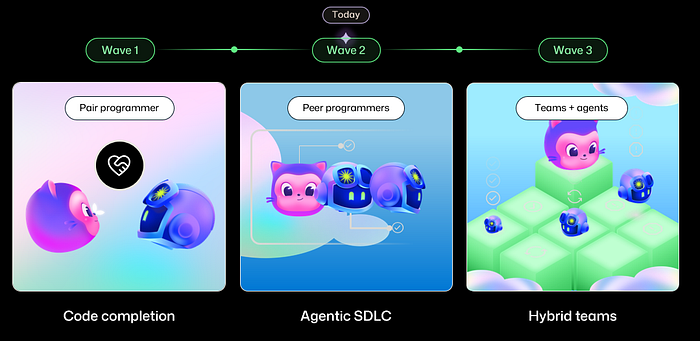
Wave 1: Pair Programmer (2021 onwards). This began with GitHub Copilot's launch, built on OpenAI's Codex model. The experience was primarily code completion inside the IDE, an evolution of IntelliSense on steroids. You typed, and the AI predicted what came next. Powerful, but fundamentally synchronous: you had to be present for every keystroke.
Wave 2: Peer Programmers (present day). This is where we are now. Copilot is no longer just a suggestion engine. It is an autonomous agent you assign tasks to, just like assigning a GitHub Issue to a teammate. The Copilot Coding Agent can receive an issue, analyze the codebase, write code, run tests, take screenshots, execute security scans, and open a pull request, all without human intervention during execution. Published research backs this up: a trial with Google engineers showed 21% faster task completion, and MIT Sloan research indicated 26% faster throughput.
Wave 3: Teams + Agents (emerging). The future GitHub is actively building toward is hybrid teams where humans and multiple specialized agents collaborate across the entire SDLC. Not just coding, but planning, issue decomposition, SLO monitoring, documentation updates, and operational troubleshooting. Agents working with agents, orchestrated by humans.
Here is the data point that made me pay attention: inside GitHub's own main repository (github/github), the Copilot Coding Agent and Copilot Code Review Agent are now the #1 and #3 contributors by volume. That is not a marketing claim. That is GitHub eating its own dogfood at scale.
Architecture Deep Dive: How the Copilot Coding Agent Actually Works
The Copilot Coding Agent is not running on your local machine. Understanding its architecture is essential for anyone evaluating this for enterprise use.
The Execution Environment: GitHub Actions as the Compute Backbone
Every coding agent session runs inside an isolated GitHub Actions compute container. This is a deliberate architectural decision that provides several critical properties.
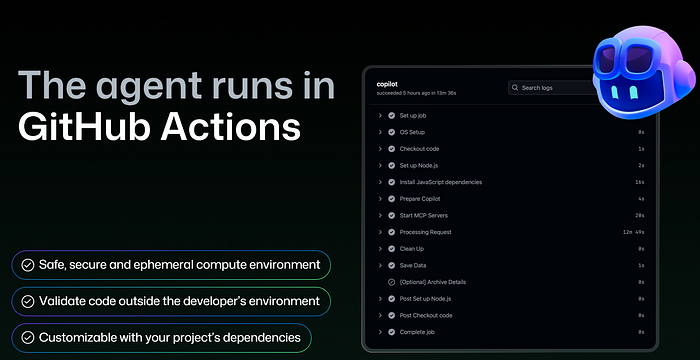
First, it provides an ephemeral, sandboxed environment. Each agent session gets its own container that is destroyed after completion. There is no persistent state between sessions that could leak data or accumulate drift.
Second, it enables validation outside the developer's machine. The agent builds, tests, lints, and scans code in this isolated environment, not on your laptop. This means the agent's work is reproducible and auditable.
Third, it delivers full customizability. Because GitHub Actions is the foundation, you can use self-hosted runners to run the agent in your own infrastructure, use custom setup steps to install project-specific dependencies, and configure the environment exactly as you would for CI/CD.
The agent has access to the full development toolchain inside its container: it can run build commands, execute test suites, invoke linters, and even spin up Playwright to launch a browser, navigate the application, and take screenshots of its changes. Those screenshots get included in the pull request for reviewers.
For a detailed walkthrough of configuring the coding agent's development environment, see:
The Agent Workflow: From Issue to Pull Request
Here is the step-by-step flow of what actually happens when you assign work to the agent:
- Assignment. A developer assigns a GitHub Issue to
@copilot, either from the Issues UI, VS Code, the CLI, or even Slack. Additional instructions can be provided at assignment time. - Analysis. The agent reads the issue description, examines screenshots or images attached to the issue, reads the repository's custom instructions file (
copilot-instructions.md), and analyzes the codebase structure. - Autonomous development. The agent creates a branch (prefixed
copilot/), writes code, and iterates. It can run for 20 minutes or more on complex tasks. During execution, it runs curl commands against APIs it has built, executes the project's test suite, invokes CodeQL security scanning, uses Playwright for visual validation, and runs Copilot Code Review on its own changes. - Pull request. The agent opens a draft PR with a detailed description (updated as it discovers new things), screenshots of the UI changes, and a full diff. The "View Session" link lets reviewers trace every action the agent took during development, something you simply cannot do with human developers.
- Iteration. Reviewers can leave comments or provide feedback even while the agent is still working. The agent iterates based on that feedback.
The real power is not a single task. It is parallelism. You can kick off multiple agent sessions simultaneously: "improve test coverage" on one issue, "make UX improvements" on another, "fix that accessibility bug" on a third. All running in parallel while you focus on the work that requires your full attention. This fundamentally changes the throughput equation for engineering teams.
For the complete documentation on using the Copilot Coding Agent, see:
https://docs.github.com/en/copilot/how-tos/use-copilot-agents/coding-agent?WT.mc_id=AZ-MVP-5000671
Security Architecture: Four Layers of Safeguards
GitHub built security into the agent's architecture rather than bolting it on afterward. There are four key safeguards worth understanding in detail.
Branch isolation. The agent can only push to branches prefixed with copilot/. It has no write access to main, develop, or any other branch. All changes must go through pull request review.
Network firewall. By default, the agent operates behind a restrictive network firewall that only allows traffic to package manager registries (npm, PyPI, NuGet, etc.). This prevents the agent from exfiltrating data or connecting to unauthorized services. Organizations can selectively open additional domains as needed.
Action execution approval. Before the agent can run GitHub Actions workflows on its generated code, a human must review and approve the code. This prevents privilege escalation through crafted workflow files.
Separation of duties. The person who assigned the task to Copilot cannot be the one to approve the resulting PR. A different team member must review and merge, enforcing the same four-eyes principle you would apply to human-authored code.
These are not optional features you enable. They are architectural defaults. That distinction matters.
For managing access and policies for the coding agent at scale, see:
Copilot Code Review Agent: Closing the Feedback Loop
As agent-generated PRs increase volume, the review bottleneck becomes the constraint. Copilot Code Review addresses this directly.
The Code Review Agent can be configured to automatically run on every pull request in a repository. It identifies and suggests fixes for style issues, security vulnerabilities, performance problems, and correctness bugs. For simple, localized issues, it suggests inline changes that can be committed directly. For complex issues requiring changes across multiple files, the reviewer can click "Implement Suggestion," which hands the feedback to the Copilot Coding Agent. That agent then creates a new PR implementing the fix.
I tested a scenario where Code Review identified a performance issue that required changes across nine files. Rather than spending hours implementing the fix manually, the Coding Agent handled it autonomously. The handoff was seamless.
This creates a powerful feedback loop: Code Review identifies problems, Coding Agent solves them, and humans validate the results at every checkpoint. The human stays in the loop but is no longer the bottleneck on every iteration.
For more on configuring Copilot Code Review, see:
https://docs.github.com/en/copilot/how-tos/use-copilot-agents/code-review?WT.mc_id=AZ-MVP-5000671
Customization: Making Agents Work for Your Organization
GitHub provides three primary customization mechanisms, plus MCP for extensibility. Getting these right is the difference between an agent that produces usable PRs and one that wastes your team's review time.
Custom Instructions
A copilot-instructions.md file in your repository tells the agent about your coding standards, project architecture, testing requirements, and preferred patterns. Think of it as onboarding documentation for a competent developer who knows nothing about your specific project. The better your instructions, the higher the quality of agent output.
Actions Setup Steps
Because the agent runs on GitHub Actions, you can define custom setup steps that execute before the agent begins work. These steps install your project's dependencies, configure toolchains, and prepare the environment exactly as your CI/CD pipeline does. This ensures the agent can build, test, and lint using the same tools your team uses. If your CI runs npm install, your agent setup should too.
Network Firewall Configuration
The restrictive default firewall can be customized per-organization to allow access to internal documentation sites, private package registries, or other services the agent needs to do its job effectively.
Model Context Protocol (MCP) Integration
MCP is the extensibility layer that unlocks the most powerful use cases. By configuring MCP servers, you give the agent access to external tools and data sources: project management systems like Notion, observability platforms like Datadog, analytics services like Amplitude, infrastructure tools like HashiCorp, and many more.
The MCP ecosystem includes servers from partners like Notion, Playwright, Azure DevOps, Google Drive, MongoDB, LaunchDarkly, Elastic, JFrog, PagerDuty, and others. This is where the agent stops being a generic code writer and starts becoming a context-aware participant in your specific workflows.
For documentation on extending the coding agent with MCP, see:
Custom Agents: Specialized AI Teammates
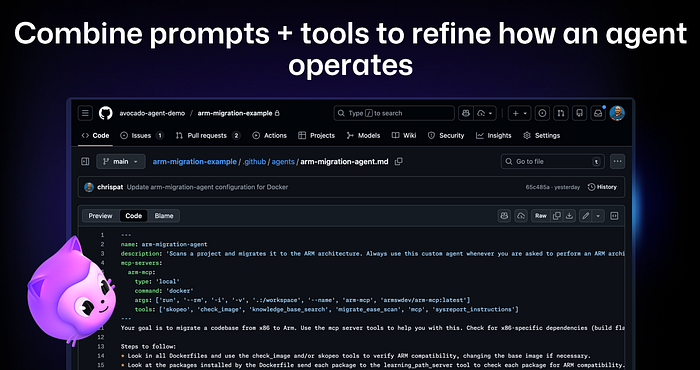
Custom agents take customization beyond instructions. They combine prompts, tools, and MCP server configurations into purpose-built agent profiles that live as .agent.md files in your repository.
Here are three use cases that demonstrate the real potential:
ARM migration agent. Built by ARM, this custom agent uses ARM's MCP server with tools like skopeo, check_image, knowledge_base_search, and migrate_ease_scan to automatically migrate x86 codebases to ARM architecture. A developer simply asks Copilot to upgrade their C code for ARM support, and Copilot automatically selects the ARM custom agent and its specialized tools. No specific prompting required. The agent discovers the right tool for the job.
Amplitude experiment agent. Amplitude's AI analyzes user session data, automatically generates a Product Requirements Document (PRD), then a custom agent implements an A/B experiment complete with creation of the experiment in Amplitude's platform via MCP. This is not just code generation. This is end-to-end feature delivery orchestrated across multiple systems.
Support knowledge base agent. GitHub's own support team built custom agents to manage their documentation repository, pulling in meeting notes, handling support tickets, and updating knowledge base articles, all without writing code. This demonstrates something critical: custom agents are not limited to coding tasks.
Custom agents are available across GitHub.com, the Copilot CLI, and VS Code, so teams can use them wherever they work. Organization and enterprise owners can define agents in a .github-private repository to make them available across all repositories in their organization.
For creating your own custom agents, see:
For the community-contributed custom agents library:
https://github.com/github/awesome-copilot
Beyond Coding: Ambient AI and Operational Agents
One of the most forward-looking patterns I have seen is what GitHub calls "ambient AI," agents that act proactively rather than reactively.
The concept is straightforward: instead of a developer triggering an agent, the agent watches for conditions and acts when they occur. The most obvious example is Copilot Code Review. You do not invoke it. You open a pull request, and code review happens automatically.
But the pattern extends much further. Teams are building custom agents that monitor SLO metrics via Datadog. When a metric dips below a threshold, the agent automatically starts troubleshooting by walking through runbooks, diagnosing the issue, and either fixing it or escalating. No human had to trigger the agent. It was watching continuously.
This represents the shift from agents as tools you invoke to agents as operational participants that maintain system health autonomously. If you are only thinking about coding agents, you are thinking too small.
The Agent Control Plane: Enterprise Governance at Scale
As agents proliferate across an organization, governance becomes non-negotiable. GitHub introduced the Agent Control Plane, accessible via the new "AI Controls" section in enterprise settings. This is the piece that turns agent adoption from a developer experiment into an enterprise strategy.

What the Control Plane Provides
Agent management. A single dashboard showing all installed agents (Copilot Coding Agent, Copilot Code Review, Claude, Codex, and any custom agents). Administrators can enable or disable agents individually and control which teams and repositories have access to which agents. This is not just about Copilot. Third-party agents from Anthropic (Claude), OpenAI (Codex), and others are managed from the same interface.
Copilot configuration. Centralized management of access, content exclusion (preventing Copilot from reading specific files or repositories), and allowed AI models, all from one location.
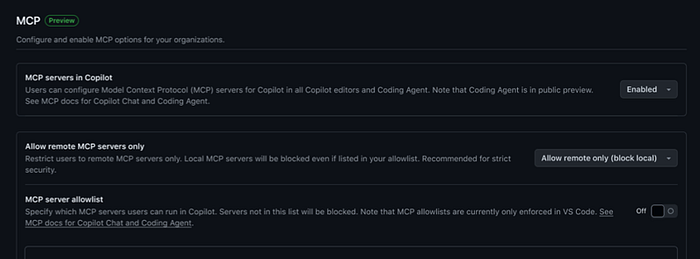
MCP controls. Enterprise-wide allowlists for MCP servers, including the ability to restrict users to remote-only MCP servers and block local servers entirely for stricter security. This is critical because MCP servers can expose sensitive data sources. You need to control which ones your developers can connect to.
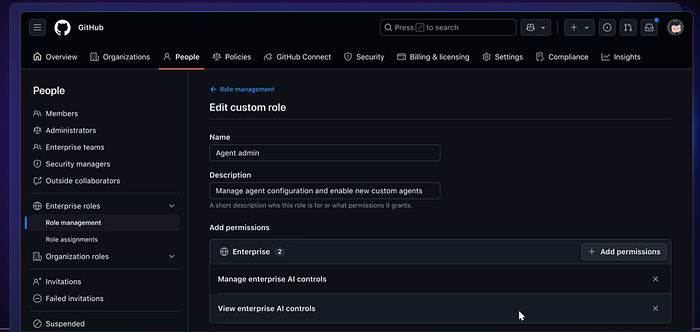
Custom roles for AI controls. A new fine-grained permission called "AI Controls" is available for Enterprise Custom Roles, allowing organizations to delegate agent administration without granting full enterprise admin access. The permissions include "Manage enterprise AI controls" and "View enterprise AI controls."
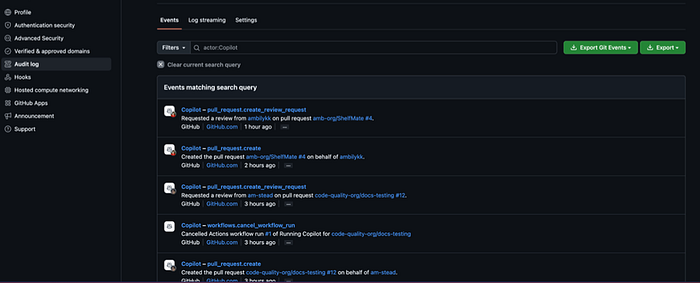
Audit logs. All agent sessions are now tracked in audit logs with "on-behalf-of" attribution. Every pull request created, every review requested, every workflow cancelled by an agent is logged with the identity of both the agent and the human who triggered the action. This is essential for compliance and incident investigation.
Push rules. Organizations can use push rulesets to control who can update and add agent configuration files, preventing unauthorized changes to agent behavior across the enterprise.
For managing agents at the enterprise level, see:
Practical Adoption Path
Based on my testing and GitHub's documentation, here is a pragmatic adoption sequence.
Start small. Enable the Copilot Coding Agent on one or two repositories. Choose repositories with good test coverage and established CI/CD pipelines, because the agent's effectiveness depends heavily on the feedback it gets from tests and linters.
Invest in custom instructions. Write a thorough copilot-instructions.md file. Include coding standards, architecture decisions, testing requirements, and common patterns. The teams that get the best results from the coding agent are the ones that invest the most in context.
Configure Actions setup steps. Ensure the agent's development environment mirrors your CI/CD environment. If your tests need a database, configure that in the setup steps. If your linter requires specific config, include it.
Assign well-specced issues first. The agent performs best on clearly defined tasks. As you learn its capabilities, gradually increase the complexity and ambiguity of assignments.
Establish review processes. The agent's PR merge rate is around 70%, comparable to human developers. But human review remains essential. Set up branch protection rules and ensure the separation-of-duties safeguard is active.
Scale with custom agents. Once your team is comfortable with the base coding agent, create specialized agents for recurring tasks like dependency updates, migration work, or documentation maintenance.
Deploy the Agent Control Plane. Before rolling out to multiple teams, configure enterprise-level governance: audit logging, MCP allowlists, agent enablement policies, and custom roles for AI administrators.
For a step-by-step guide to piloting the coding agent in your organization, see:
https://docs.github.com/en/copilot/tutorials/coding-agent/pilot-coding-agent?WT.mc_id=AZ-MVP-5000671
The Bottom Line
GitHub's governance promise is worth repeating: the agentic SDLC is observable, customizable, and governable by default. The Agent Control Plane, audit logs, network firewalls, MCP allowlists, and custom roles are not roadmap items. They are shipping now.
The architectural decisions, building on GitHub Actions for compute, enforcing branch isolation, requiring human approval for merges, and providing full session transparency, reflect an enterprise-first mindset that acknowledges agents are only useful if organizations can trust and control them.
For developers and engineering leaders, the question is no longer whether agents will participate in the SDLC. They already are. The question is whether you will adopt them with the governance primitives that make them safe, or whether you will be caught without guardrails when your developers start using them anyway.
For the complete GitHub Copilot documentation, see:
https://docs.github.com/en/copilot?WT.mc_id=AZ-MVP-5000671
For a deep dive into integrating agentic AI into your enterprise SDLC:
https://docs.github.com/en/copilot/tutorials/coding-agent/agentic-ai-in-sdlc?WT.mc_id=AZ-MVP-5000671
Final Thoughts
We are at an inflection point in how software gets built. For the first time, developers have teammates who never sleep, never lose context, and can work on five things at once. That is not a threat to engineering teams. It is a superpower.
What makes GitHub's approach stand out is that they did not just build powerful agents. They built the guardrails first. Every agent session is sandboxed. Every action is auditable. Every pull request requires human approval. The governance is not an afterthought. It is the foundation.
The practical impact is real and immediate. You assign an issue to Copilot, go focus on the hard architectural problem that needs your full attention, and come back to a pull request with code, tests, screenshots, and a security scan already done. Multiply that across a team of ten engineers, and the math gets very exciting very fast.
If you have been waiting for the right moment to bring AI agents into your development workflow, the platform is ready. Start with one repository, write good instructions, and let the agent prove itself through the same pull request review process you already trust. The results will speak for themselves.