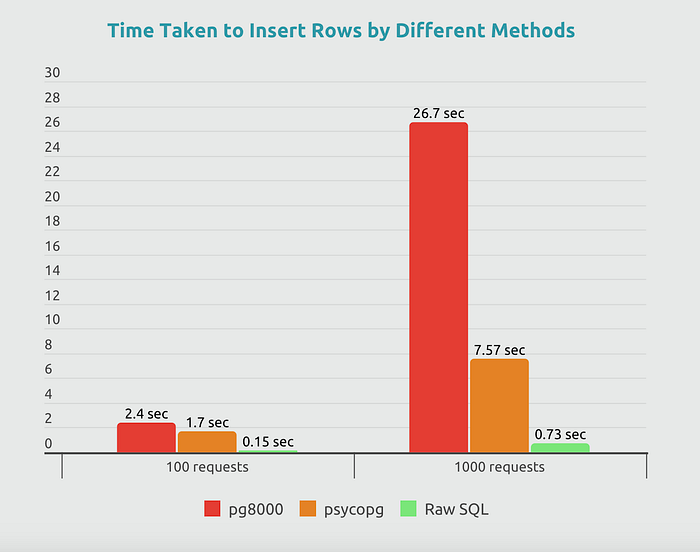


You probably already know that rule number one when performing inserts is to use bulk inserts, they are much more efficient than executing multiple single operations. However, there's something you may not know: there are various methods to implement bulk inserts, and as demonstrated in the chart, the differences in performance can be significant.
First things first, I'm using SQLAlchemy to connect to the database in Python. While there are many ways to connect to a database and perform SQL queries, this article will focus on a specific case where you prefer not to use ORM models for operations and want to utilise raw SQL queries with SQLAlchemy.
Let's say you have code similar to this:
from sqlalchemy import text

input_data = [
    {"id": 1, "name": "image_1", "size": 453},
    {"id": 2, "name": "image_2", "size": 534},
    {"id": 3, "name": "image_3", "size": 345},
]


query = text("INSERT INTO files (id, name, size) VALUES (:id, :name, :size)")

db_session.execute(query, input_data)
db_session.commit()
This code works, but let's take a look at the database connection string, which most likely looks similar to the following:
DATABASE_URL = f"postgresql+pg8000://{config['DB_USER']}:{config['DB_USER_PASS']}@{config['DB_HOST']}:{config['DB_PORT']}/{config['DB_NAME']}"We are interested in the database driver here (pg8000). A driver is a software component that enables communication between an application and a database, translating the application's requests into a format the database can understand. In the case of pg8000, it is a driver that allows Python applications to interact with PostgreSQL databases using SQL queries.
pg8000 is fully implemented in Python, which makes it less performant.
psycopg2 is implemented in C, and simply changing "pg8000" to "psycopg2" in your connection string will enhance performance. (Before making this change, be sure to install it using pip install psycopg2)
DATABASE_URL = f"postgresql+psycopg2://{config['DB_USER']}:{config['DB_USER_PASS']}@{config['DB_HOST']}:{config['DB_PORT']}/{config['DB_NAME']}"However, neither of these drivers optimises batch inserts with parameterised data effectively, leading to slower performance due to the overhead of binding parameters for each insert.
To understand why, let's look at what actually happens. When you pass a list of dicts to `execute()` with a parameterised query, SQLAlchemy performs an "executemany" operation. This means each row is sent to the database as a separate INSERT statement with its own round-trip. With 1000 rows, that's 1000 round-trips.
The fastest approach is to send everything in a single round-trip. Here's how to do it properly using `psycopg2.extras.execute_values`:
from psycopg2.extras import execute_values

input_data = [
    {"id": 1, "name": "image_1", "size": 453},
    {"id": 2, "name": "image_2", "size": 534},
    {"id": 3, "name": "image_3", "size": 345},
]

values = [(row["id"], row["name"], row["size"]) for row in input_data]

query = "INSERT INTO files (id, name, size) VALUES %s"

# Using the raw psycopg2 connection from SQLAlchemy
raw_conn = db_session.connection().connection
with raw_conn.cursor() as cursor:
    execute_values(cursor, query, values)
db_session.commit()
`execute_values` constructs a single INSERT statement with all the rows packed into one VALUES clause, but it handles the parameterisation safely for you. No SQL injection risk, and all the performance benefits of a single round-trip.
This executed 37 times faster than the original pg8000 + executemany approach with a scale of 1000 rows. The gain comes from two factors combined: the faster C-based driver (psycopg2) and eliminating 999 unnecessary round-trips to the database.
If you want to keep things within SQLAlchemy without dropping to raw psycopg2, you can also construct the VALUES clause manually:
quoted_input_data = ", ".join(
    [
        f"({row['id']}, '{row['name']}', {row['size']})"
        for row in input_data
    ]
)

query = text(f"""INSERT INTO files (id, name, size) VALUES {quoted_input_data}""")

db_session.execute(query)
db_session.commit()
This gives similar performance, but beware: this method exposes your application to SQL injection vulnerabilities if the data is not sanitised properly. I'd recommend the `execute_values` approach for production code and only use raw string construction for quick benchmarks or internal scripts where you fully control the input data.
At the end of the day, understanding what happens under the hood (how many round-trips your code actually makes) is the key to optimising database performance.
To make things even better in terms of database interaction performance and overall backend performance, I recommend looking into asyncpg. The only downside is that your entire application must be asynchronous to utilise this lib effectively, but that's a topic for another time!