

I use Claude Code daily as a Senior Machine Learning Engineer at a major bank. From the start, even without knowing any best practices, it made me noticeably faster. That alone says a lot about the tool. Simple prompts like "create an architecture diagram of this codebase" produced results that leveled up our code documentation and deepened my understanding of what we'd built.
Then I learned about the CLAUDE.md file, a way to define your project rules and conventions so Claude remembers them every session. That was a big jump in quality. But shortly after, I started hearing a flood of new vocabulary online and at work. "Skills." "Subagents." "Plugins." "MCP." "Hooks." Suddenly Claude Code wasn't just an LLM I talked to. It was a tool that needed real, dedicated learning.
I read articles. I experimented. I built skills and agents. But even after using them, the "why" stayed blurry. I kept asking myself questions like: Why do we need skills if agents can do the same thing? Why is there something called commands too? What's the difference?
So I spent weeks digging through the official documentation and testing things until it clicked. What finally helped was realizing that all of these concepts map to distinct feature categories within Claude Code. At the time of writing, there are seven: CLAUDE.md, Skills (which now include what used to be called Commands), Subagents, Agent Teams, Plugins, Hooks, and MCP Servers. This article covers the first five. Hooks and MCP are powerful but different enough that they deserve their own article.
What follows is the mental model I built from those weeks of learning. My goal is to give you the why, when, and how for each of these features. This isn't a docs summary or a feature overview. It's what I learned, organized so you don't have to spend the time I did.
The Mental Model
I split four of the features into two categories: Knowledge (what Claude knows and remembers) and Workers (tasks Claude handles in isolation, away from your main session). Plugins sit outside that frame. They're how you package and share the other four across projects and teams.
Here's how they map:
CLAUDE.md and Skills (Knowledge): Use these when you're tired of repeating yourself. CLAUDE.md is for rules that should always be active. It loads at the start of every session and stays in context the entire time. Skills are for instructions Claude should only reach for when the situation calls for it. They load on demand, so you save on tokens when they're not relevant.
That distinction matters more than it sounds. CLAUDE.md is always-on context. Skills are on-demand context. If a rule applies to nearly every task ("always prefix commit messages with feat:, fix:, or chore:," "never modify files in src/legacy/"), put it in CLAUDE.md. If it's a specific workflow that only matters sometimes (like running a PR review checklist or generating a changelog), make it a Skill. The more you put in CLAUDE.md that should be a Skill, the more context you waste every turn.
Subagents and Agent Teams (Workers): Use these to parallelize work and protect your context window. If you need Claude to research 50 files, don't let it chew through your main session's context doing it. Spawn a subagent so the heavy lifting happens in a separate context and your main conversation stays clean.
The line between them is coordination. Subagents are independent. They do a job, return a result, and never talk to each other. If subagent A discovers something subagent B needs, your main agent has to relay it. Agent Teams remove that bottleneck. Teammates share a task list and message each other directly. Use subagents when the tasks are independent. Use Agent Teams when the workers need to coordinate mid-task.
Plugins (The Package): Use these for portability. Once you've built a solid set of skills or agents, bundle them into a Plugin so your team can install and use them across different repos without copy-pasting files around.
That's the frame. The rest of the article walks through each one in detail.
CLAUDE.md
This is the simplest one and the first thing you should set up. It's a markdown file at the root of your project that Claude reads at the start of every session. Whatever you put in there, Claude just knows.
I keep mine pretty simple. Project conventions, directory structure, things like "for all git commits, sacrifice grammar for the sake of concision" or "never modify files in the src/legacy directory." Anything you find yourself repeating to Claude across sessions, put it in CLAUDE.md so you don't have to say it again.
The key thing to understand is that CLAUDE.md is always loaded. It's always consuming context window space. So keep it focused. Anthropic's best practices guide goes deeper on context management, which is worth reading, because context is your most important resource in Claude Code. Everything you do with extensions either consumes context or protects it. That tension runs through the rest of this article.
CLAUDE.md can also exist at multiple levels. There's a project-level file at the root of your repo, a user-level file at ~/.claude/CLAUDE.md that follows you across all projects, and you can place additional CLAUDE.md files in subdirectories for monorepos where different packages need different rules. Parent-level files load immediately at startup. Subdirectory files load lazily, only when Claude reads files in that directory during your session. So the context cost scales with what you're actually working on, not the total number of CLAUDE.md files in the repo.
Skills
Skills are what Anthropic calls the "most flexible extension type." It may not be a coincidence that it's the one I reach for most.
A skill is a reusable set of instructions you write once and make available to Claude whenever it's relevant. I got tired of explaining how I wanted architecture diagrams generated: which format to use, what to include, how to label the components. So I wrote a skill once, and now every time I ask Claude to diagram a service, it just knows. No reminding, no copy-pasting prompts.
Practically, a skill is a folder containing a file called SKILL.md. That file has two parts: a small header (called frontmatter) that tells Claude what the skill is for, and the body, which contains the actual instructions. The folder can also hold supporting files like reference docs or helper scripts that Claude pulls in when it needs them.
Here's what mine looks like. The file lives at ~/.claude/skills/arch-diagram/SKILL.md:
---
name: architecture-diagram
description: Use this when generating architecture or system diagrams
allowed-tools: Read, Grep
---

Use Mermaid format for all diagrams.
Include service boundaries, data flow direction, and external dependencies.
Label every connection with the protocol (REST, gRPC, Kafka, etc.).
Keep it to one page. If the system is too large, break it into sub-diagrams by domain.
The description field is what Claude uses to decide when the skill is relevant, so make it specific. allowed-tools locks down what Claude can actually do when the skill is active. There are other frontmatter fields you can add too, like disable-model-invocation and context, which I'll cover below. For the full list, see the frontmatter reference in the official docs.
How skills get triggered
Skills load in stages. The official docs call this progressive disclosure. At the start of a session, Claude only sees the name and description of every available skill, not the full content. When Claude decides a skill is relevant to what you're asking, it loads the full SKILL.md. If your skill references other files (like REFERENCE.md or helper scripts), those only get loaded if Claude actually needs them.
This matters because if every skill dumped its full content into context at session start, you'd burn through your window before doing any real work. Progressive disclosure keeps things light by only loading what's actually needed.
This also means your description is doing all the heavy lifting for discovery. If it's vague, like "helps with documents," Claude won't know when to reach for it. Be specific: "Use when working with PDF files and need to extract text and tables."
By default, Claude autonomously decides when to use a skill based on the task and the skill's description. You don't have to type anything special. But you can also invoke skills manually like a slash command. If you have a skill at .claude/skills/deploy/SKILL.md, you can type /deploy and Claude will load and follow it. This is useful for skills with side effects (like actually deploying something) where you don't want Claude firing them on its own.
To prevent Claude from auto-invoking a skill, add disable-model-invocation: true to the frontmatter:
---
name: deploy
description: Deploy the current branch to staging
disable-model-invocation: true
---
Now it only runs when you explicitly call /deploy.
If you used commands before: They still work. But they've been merged into skills. A file at
.claude/commands/review.mdand a skill at.claude/skills/review/SKILL.mdboth create/reviewand behave the same way. Skills give you more control (auto-invocation, forking into subagents, supporting files), and take precedence if both exist. I'd use skills going forward.
Subagents
Once I understood skills, subagents were the next thing that confused me. Here's the simplest way I can explain it: a subagent is a separate Claude instance that runs in its own context window, does a job, and returns only the results to your main conversation.
Why does that matter? When you ask Claude to research how authentication works across your codebase, it might read 30 files. All of that lands in your main conversation, pushing out earlier context. A subagent prevents this. The research happens in a separate context, and your main session gets back a clean summary. My rule of thumb: if a task touches more than about five files, it's probably worth isolating in a subagent.
Built-in subagents
Claude Code ships with built-in subagents you're already using, probably without realizing it. They're auto-invoked based on what you're doing. Here are the ones I find most useful:
Explore: Fast, read-only, runs on Haiku. Good for "where is X?" or "find all files that import Y."
Plan: Research-only. Used in plan mode to scan the codebase and return a distilled summary so your main session doesn't bloat during the planning phase.
General-purpose: The heavy lifter. Full tool access. Can read, write, and execute.
Claude Code Guide: My personal favorite. This is a built-in documentation expert. When you ask Claude about its own features ("how do I write a skill?" or "can Claude Code do X?"), it automatically spins up this subagent to look up the answer in the official docs.
Creating your own subagent
Technically, an "agent" and a "subagent" are the same thing. An agent is just a Claude instance doing autonomous work; we call it a "subagent" when it's spawned by your main session to handle a specific task.
You can create a custom subagent using the /agents command, which walks you through the setup interactively. Or you can create the file by hand.
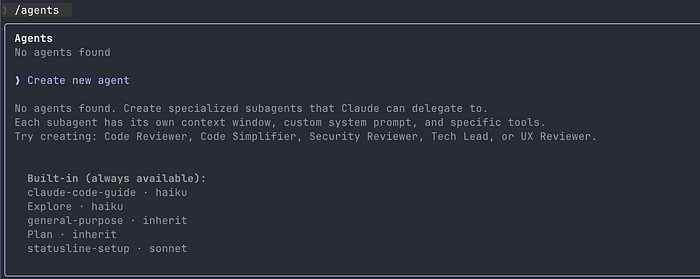
Custom subagents live as markdown files in .claude/agents/ (project-level) or ~/.claude/agents/ (personal). The format looks similar to a skill: YAML frontmatter plus system instructions.
---
name: code-reviewer
description: Reviews code for quality and best practices. Use after writing or modifying code.
tools: Read, Grep, Glob, Bash
model: sonnet
---
You are a senior code reviewer.
When invoked:
1. Run git diff to see recent changes
2. Focus on modified files
3. Review for readability, error handling, security, and test coverage
Provide feedback organized by priority:
- Critical (must fix)
- Warnings (should fix)
- Suggestions (nice to have)Agent Teams
Agent teams take the subagent concept and scale it up. Instead of one worker doing a job and reporting back, you get a full crew: a lead agent that coordinates, and multiple teammates that share a task list, claim work, and communicate directly with each other. This matters for problems that aren't cleanly decomposable into isolated subtasks. A large codebase migration where the frontend agent needs types that the backend agent is still defining. A multi-angle security review where findings in one area inform what to look for in another. These are coordination problems, and coordination requires communication between workers.
That said, for most day-to-day work, individual subagents are enough. Agent teams shine when you need real parallel collaboration. From my experience, they eat significantly more tokens than individual subagents. Each teammate is a separate Claude instance, and because they're constantly messaging each other to share findings and coordinate next steps, the communication overhead adds up fast.
One more thing worth knowing: Agent Teams are experimental. They're disabled by default. You need to enable them by setting CLAUDE_CODE_EXPERIMENTAL_AGENT_TEAMS in your environment or settings.
The power couple: wiring skills into subagents
This is the part I wish someone had explained to me earlier, because this is where it all clicks.
Skills and subagents aren't separate systems. They're connected in two directions.
Direction 1: Skills into Subagents. Use the skills: frontmatter field on a subagent to give it specific expertise.
---
name: api-developer
description: Implement API endpoints following team conventions
skills:
- api-conventions
- error-handling-patterns
---
Implement API endpoints. Follow the conventions and patterns
from the preloaded skills.The full content of each listed skill gets injected into the subagent's context at startup. The subagent doesn't need to discover them; they're already loaded. This is the way to guarantee a subagent has specific knowledge available immediately.
Direction 2: Subagents from Skills. Use context: fork in a skill's frontmatter to force it to run in a separate context, keeping your main conversation clean.
---
name: research-auth
description: Research authentication patterns in the codebase
context: fork
---
Analyze how authentication is implemented across the codebase.
Summarize patterns and identify inconsistencies.One gotcha here: context: fork only makes sense for skills that contain an actual task. If your skill is just guidelines (like "use these API conventions"), forking it into a subagent means the agent receives guidelines with nothing to do and returns nothing useful.
You might also be wondering: why use a forked skill instead of just making an agent? My rule of thumb is, just make an agent if you're building something new. context: fork is for when you already have a skill and want to run it in isolation without duplicating it into a separate agent file. Same logic, just running in its own context. That's the only real difference I see.
Plugins
Plugins are the packaging layer. Everything I've talked about so far (skills, subagents, hooks, MCP servers) can be bundled into a plugin and distributed as a single installable unit.
You'd use a plugin when you want to share your tools with others or need cross-project portability. If it's just for one repo, keep things in .claude/. If you need it across your whole org, bundle it into a plugin.
Say your team has a handful of skills and agents they use everywhere: commit message formatting, PR reviews, code style checks, a migration agent. Instead of copying .claude/skills/ and .claude/agents/ into every repo, you bundle them into a plugin:
team-conventions/
  .claude-plugin/
    plugin.json
  skills/
    commit-message/
      SKILL.md
    pr-review/
      SKILL.md
    code-style/
      SKILL.md
  agents/
    migration-agent.md
The plugin.json is minimal:
{
  "name": "team-conventions",
  "description": "Shared engineering conventions",
  "version": "1.0.0"
}
Each SKILL.md follows the same format you've already seen, and the agent markdown file works just like ones in .claude/agents/. The plugin is just packaging around them.
You can build and test a plugin entirely on your machine. Create the directory, add your skills, and load it with --plugin-dir:
claude --plugin-dir ./team-conventionsThis tells Claude Code to load the plugin from that path for the current session. Nothing is installed globally; it only lives for that session. Your plugin's skills show up in the slash command menu, and agents show up namespaced under the plugin name (e.g., @"team-conventions:migration-agent"). This namespacing means multiple plugins can coexist without name collisions.

Marketplaces
Plugins are distributed through marketplaces. Anthropic has an official one that's available by default; you can submit plugins at claude.ai/settings/plugins/submit. You can also create your own team marketplace. It's just a git repo with a marketplace.json file.
# Add a marketplace
/plugin marketplace add https://github.com/your-org/claude-plugins
# Install a plugin from it
/plugin install team-conventions@your-org-plugins
When you install from a marketplace, the plugin gets cached to ~/.claude/plugins/cache/ so it's available across all your projects.
Key Takeaway
You don't need to adopt all of these at once. Here's the path I'd recommend:
Start with CLAUDE.md for rules you want active every session. Move to Skills for specific workflows you only need sometimes. Reach for Subagents when a task would bloat your context. And when your setup is worth sharing, package it into a Plugin so the rest of your team can use it too. Agent Teams are there when you outgrow individual subagents, but most people won't need them day to day.
If you remember one thing from this article, make it this: Skills are knowledge. Subagents are workers. Agent Teams are workers that talk to each other. That's the model. Apply it to organize your setup, preserve your context, and focus on shipping code.