
Loop Engineering is the new kid on the block. A single tweet in early June has taken the industry by storm.
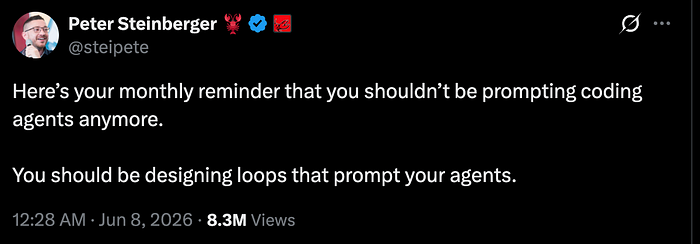
AI has advanced rapidly, and the industry seems to coin a new term ending in "Engineering" whenever it discovers a reusable pattern.
In the past 24 months, we went from Prompt Engineering to Context Engineering to Harness Engineering to Loop Engineering in no time.
While Loop Engineering is a new concept and still in its infancy, the internet has been flooded with its posts.
What exactly is Loop Engineering? How does it work? Should developers stop prompting now?
In this article, we'll answer these questions. We'll also explore the mechanics of Loop Engineering and share best practices for using it effectively.
With that, let's begin by revisiting our existing AI workflows.
How Developers use AI Agents
Every other company relies on Claude Code, Codex, or another AI coding tool for software development. Here's what a typical development task looks like:
- You open an AI agent in the terminal and enter a prompt containing the details of the coding task.
- The agent reads the prompt, uses the AI model and modifies the necessary files in the codebase.
- You realize that a test is failing and ask the agent to fix it.
- The agent finds a fix and rectifies the error.
- You find that the coverage is below a threshold and again prompt it.
- This cycle continues until you're confident that the new feature works as expected and doesn't break any existing feature.
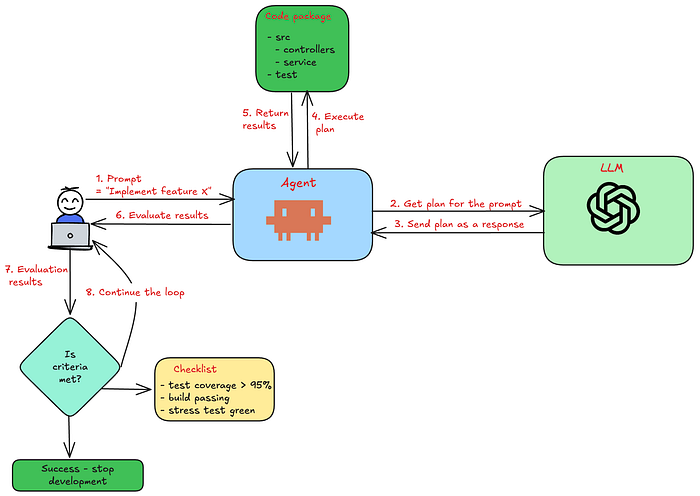
The above process would easily take you 4–5 hours depending on the task complexity.
The primary bottleneck in the workflow is the developer. While a machine takes less than a second to verify, a developer would take a few minutes.
With each iteration, the time compounds and delays the completion.
Can we automate the repetitive and manual aspects?
Let's explore this in the next section.
Loop Engineering
Every time a developer intervenes, they have to spend minutes analysing the results and then writing prompts. This consumes significant engineering bandwidth and slows down the process.
The core idea of Loop Engineering is to eliminate developer intervention altogether through agentic automation. In the software development context, this includes tasks such as:
- Verifying the working of unit tests.
- Ensuring the coverage is above a threshold.
- Running the linters.
- Executing stress tests and guaranteeing no performance impact.
To remove developer intervention, the developer would state the success criteria and the agentic system would verify whether the criteria is met after making the code changes. It would continue until the criteria is met.
Once developer intervention is eliminated, the agent becomes autonomous and works until the task is done.
We can define Loop Engineering as — The art of designing autonomous systems that work towards a goal without human prompts.
As Boris Cherny, the creator of Claude Code said — "I don't write prompts any more. I write loops that self-prompt Claude Code".
Now, that you understand the fundamentals of Loop Engineering, let's now walk through the different constructs provided by AI agents such as Claude Code or Codex.
Types of Loops
There are two broad categories of tasks that require loops:
- Recurring tasks — Tasks such as checking the open PRs, deployment status, open customer tickets, etc. A developer has to copy and paste the same prompt and execute it several times at regular intervals.
- Long-running tasks — These include debugging a complex issue, migrating an API, upgrading an underlying dependency, or introducing a new feature. As discussed before, a developer needs to babysit the AI agent until the task completes.
Loop
Claude Code and Codex both provide a /loop command. It is similar to a cron job and you specify how frequently you want to run the command.
The following example illustrates how you can triage your open customer tickets every hour.
With this command, you no longer need to prompt the agent and it regularly executes the prompt automatically at the configured interval.
However, the command has the following nuances:
- Autonomy — Only the prompt execution is autonomous. Once the prompt execution completes, it's the developer's job to complete the verification and take the next steps.
- Deterministic flows — The technique can be overkill for deterministic workflows like checking the build status. A simple script and a cron in shell would give better results. It's suited for tasks that have ambiguity such as identifying the root cause of a build failure or next steps for a task.
- Developer machine — If you close your laptop or restart your machine, you would lose all the scheduled prompts. So, in case you want predictable execution, you must prefer to use a cloud VM or any managed cloud environment.
While the loop helps you with automation, you need to be mindful of the token burn rate. Before configuring a prompt on loop, you must evaluate whether the task is sufficiently complex or long-running to justify continuous execution.
For simple tasks such as checking build failure, the trade-off of burning tokens is an worthwhile when compared to the cost of engineering time.
Let's now understand how complex and long-running tasks can be tackled.
Goal
The /goal command enables you to specify a complex task along with its termination condition. The agent continues working on the task until the condition is met.
The agent uses multiple iterations to accomplish the goal. Each iteration involves interaction with:
- Generator model — This is the main model that the agent interacts with. It's a large slow model and handles the code generation aspects.
- Evaluator model — Once the code generation completes, the results are fed into the Evaluator model, which is a smaller, faster model. If the results don't meet the terminating condition, then the agent continues with another iteration.
The following diagram illustrates how the Agent interacts with the LLM and drives a goal to completion.
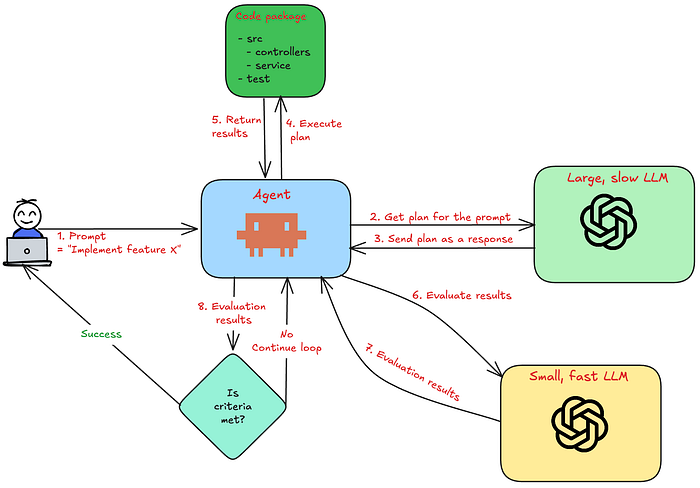
The terminating condition must be measurable such as code coverage above 90%, zero unit tests failing, etc.
The /goal is useful in scenarios such as:
- Large-scale refactors or API migrations.
- Developing a specific feature from the ground up without impacting the working of the existing system.
- Performance tuning where you need to optimize the working of a workflow without changing the end results.
The /goal command provides true autonomy but the downside is higher token costs. If you don't specify the terminating condition correctly, the agent may continue iterating indefinitely and you will be surprised to look at your AI bill.
However, good planning coupled with best practices would accelerate your productivity and keep the costs low.
With that, let's go over some best practices that you can adopt while building autonomous loops using goal.
Best practices
Writing effective goals
An effective goal consists of the following parts:
- Objective — Well-defined goal or the end state of the system.
- Acceptance criteria — How would you measure the success of the goal? For example,
npm run lintexits with 0. - Constraints — Define what the agent must not change while working on the goal. For example, the latency of the API must not increase beyond 20 ms.
Vague acceptance criteria or terminating condition don't provide sufficient clarity to AI agents. In the worst case, the agent would continue iterating not knowing when to stop.
The following is an example of vague and a good condition:
- Vague condition: Improve the API performance.
- Good condition: Improve the performance of the
/newsFeedAPI by reducing latency by at least 20 ms.
In the first condition, the agent wouldn't know which API it needs to optimize or by how much. For the second condition, the evaluator knows the measurable output is latency and the agent would iterate until it improves the latency by 20 ms.
Limiting iterations
To prevent an AI agent from running infinitely, a good practice is to add a limit on the number of iterations.
The following prompt shows how you can achieve this.
Combine with plan mode
One of the hallmarks of great AI output is a comprehensive plan. If you don't understand the plan well enough, then it's less likely for an AI agent to execute it well.
As a practice, you must spend time planning the task and create a detailed plan that can then be fed into the agent as a goal.
Managing stuck goals
At regular intervals, check if the goal is stuck and the agent is repeatedly running into the same errors. If the error doesn't change for three or more turns, you need to investigate and revisit the goal.
Often breaking down a broader goal into sub-goals helps. Sub-goals provide more clarity and have less context overhead which an agent can easily handle.
Skills, MCP, Sub-Agents
For a loop to be effective, it requires:
- Skills — In the absence of relevant skills, the agent has to repeat the same task every iteration. Before defining a goal, make sure that the dependent skills exist. For instance — Triaging skills before starting complex debugging.
- MCP —Without a dependent MCP server, the loop would fail and the agent wouldn't be able to exchange data with the relevant source. So, you must run a pre-requisite check on the availability of MCP servers.
- Sub-Agents — Having specialized agents helps the main agent to delegate the work and also optimize the context. For example, a
writingagent for writing theREADME.mdfiles. The loop automatically determines the sub-agents at the run-time.
Conclusion
Although Loop Engineering sounds intimidating, at its core it eliminates manual intervention resulting in autonomous agents.
Currently, AI agents enable us to implement loops using /loop and /goal directives. The former is useful for automating repeated tasks while the latter makes an agent fully autonomous and continue until the objectives are met.
In the future, we will have to often make a choice between a one-off prompt, a loop and a goal. The following table provides a decision matrix on choosing the right solution for a given problem.
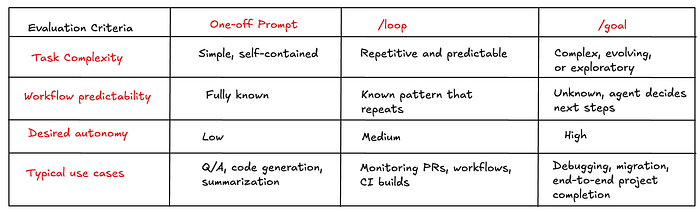
While Loop Engineering introduces another layer of abstraction on top of the code, it doesn't mean developers no longer need to understand the product or the details.
A good goal requires clear specification and makes it increasingly important for developers to deepen their domain expertise, knowledge of internal workings and the system architecture to build robust systems. 🚀
What do you think is the next abstraction? Designing loops that design loops? 🤔
Leave your thoughts in the comments below.
Before you go: