

How I turned four Proxmox nodes, some enterprise surplus drives, and an afternoon into a fully automated HA k3s cluster with Rancher, Traefik, and Ansible — all running on hardware that draws less power than a gaming PC.
I've been running a homelab for a while — a four-node Proxmox cluster hosting Pi-hole, Nextcloud, Immich (my self-hosted Google Photos replacement), and a handful of other services. Everything ran as LXC containers or VMs, managed manually through the Proxmox UI. It worked, but it didn't scale, it wasn't reproducible, and every time I wanted to add a service, I was back in the console doing the same setup dance.
I wanted Kubernetes. Not the managed cloud kind — the kind you build yourself, understand deeply, and can tear down and rebuild in 15 minutes. This is the story of that build.
The hardware: making the most of what you have
My cluster is a mix of mini PCs and one enterprise beast:
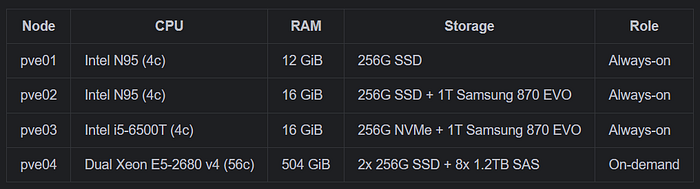
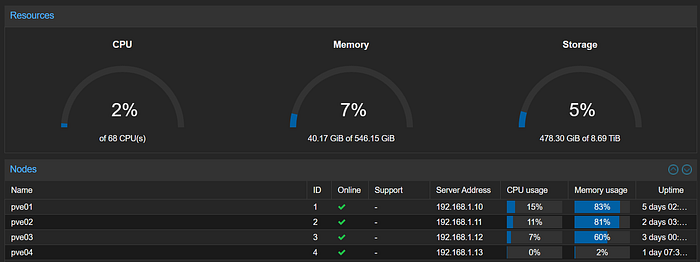
The first three nodes are small, quiet, and sip power — perfect for 24/7 operation. The fourth is a Dell enterprise server with 56 cores and half a terabyte of RAM. It also pulls 300–400W at idle, so it runs on-demand only — powered on for heavy compute, then shut down.
The eight SAS drives in pve04 are enterprise 10K RPM drives. I configured them as a ZFS raidz2 pool, giving me 6TB of usable storage with 2-drive fault tolerance.
The architecture decision: k3s
I chose k3s for several reasons. The N95 nodes have just 4 cores and 12–16GB of RAM — full kubeadm with separate etcd would consume too much overhead. k3s bundles everything into a single binary: API server, controller-manager, scheduler, and embedded etcd. A k3s server node uses roughly 500MB of RAM for the control plane, leaving the rest for workloads.
The HA topology uses embedded etcd across three server nodes. Three is the minimum for consensus — etcd uses the Raft algorithm, which requires a majority (quorum) to commit writes. With three nodes, any single node can fail and the cluster continues operating normally.
k3s-master-1 (pve01) ──┐
k3s-master-2 (pve02) ──┤── etcd quorum (2 of 3 = healthy)
k3s-master-3 (pve03) ──┘
k3s-worker-1 (pve04) ───── on-demand agent (tainted)
A critical design choice: I did not taint the server nodes. Unlike standard kubeadm clusters, my k3s masters accept workloads. In a 3-node homelab, every node counts — dedicating them solely to control plane would waste 90% of available resources. The lightweight services I run (DDNS updater, n8n, etc) coexist happily alongside etcd.
The on-demand worker: Kubernetes meets power management
The pve04 worker node is where things get interesting. It's tainted with on-demand=true:NoSchedule, meaning no pods land there unless they explicitly tolerate the taint. When the server is off, its pods sit in Pending state — no disruption to the cluster.
When I power it on, the k3s agent automatically reconnects (it persists its identity across reboots), the node transitions to Ready, and the Kubernetes scheduler places the tolerating workloads. When I'm done, I drain the node and shut it down:
kubectl drain k3s-worker-1 --ignore-daemonsets --delete-emptydir-data
# Then power off via Proxmox or IPMI
This pattern works perfectly for heavy workloads like Ollama (LLM inference needs the 504GB RAM) and Immich ML batch processing (face detection across 332GB of photos benefits from 56 cores).
kube-vip + MetalLB: stable networking without cloud providers
Two problems to solve: the Kubernetes API needs a single stable endpoint (not tied to any one node), and services need real IPs that devices on my LAN can reach.
kube-vip runs as a DaemonSet on control plane nodes and manages a floating VIP (192.168.1.60) for the API server. One pod is elected leader via Kubernetes lease objects and binds the VIP using gratuitous ARP. If the leader dies, another takes over in seconds. All kubectl commands and agent connections target this VIP.
MetalLB in L2 mode provides LoadBalancer IPs from a reserved pool (192.168.1.61–199). Traefik gets the first IP (192.168.1.61), which becomes the single entry point for all HTTP/HTTPS traffic. I reserved this range in my pfSense DHCP server to prevent conflicts.
Traefik as the universal ingress
I disabled k3s's bundled Traefik and installed it via Helm with custom configuration. This gives me full control over the chart version and values.
The interesting challenge: not all my services run in Kubernetes. Immich and Nextcloud are LXC containers on the Proxmox hosts, not pods. Traefik inside k3s needs to route to these external IPs.
The solution is a Kubernetes Service without a selector, paired with a manual Endpoints resource:
apiVersion: v1
kind: Service
metadata:
  name: immich
  namespace: external-services
spec:
  ports:
    - port: 2283
      targetPort: 2283
---
apiVersion: v1
kind: Endpoints
metadata:
  name: immich
  namespace: external-services
subsets:
  - addresses:
      - ip: 192.168.1.20    # LXC container IP
    ports:
      - port: 2283
Traefik treats this identically to a pod-backed service. An IngressRoute with the appropriate Host match routes traffic, terminates TLS, and forwards to the LXC container. This lets me replace Nginx Proxy Manager entirely — one ingress controller for everything, managed declaratively.
For TLS, I use two cert-manager ClusterIssuers: a self-signed CA for internal services (Rancher, Traefik dashboard) and Let's Encrypt via Cloudflare DNS-01 for internet-facing services. DNS-01 is ideal for homelabs — it works behind NAT without opening port 80 and supports wildcard certificates.
Ansible: infrastructure as code
Every manual step is a future debugging session. I automated the entire stack with Ansible — from OS preparation through Rancher deployment. The playbook is idempotent: running it twice changes nothing.
homelab-k3s/
├── inventory/
│   ├── hosts.yml                    # Node IPs and roles
│   └── group_vars/all.yml           # Versions, IPs, vault-encrypted token
├── roles/
│   ├── common/                      # OS prep, packages, sysctl, modules
│   ├── k3s-server/                  # Bootstrap + join with kube-vip
│   ├── k3s-agent/                   # Agent join with taints/labels
│   └── rancher/                     # MetalLB, cert-manager, Traefik, Rancher
├── playbooks/
│   ├── site.yml                     # Full deploy
│   └── reset.yml                    # Complete teardown
└── ansible.cfg
The cluster token is encrypted with ansible-vault — the vault password file lives outside the repo. This means the project can be public on GitHub without exposing secrets.
The full deploy from clean VMs to a running cluster with Rancher takes about 15 minutes:
ansible-playbook playbooks/site.ymlTearing it all down and starting fresh:
ansible-playbook playbooks/reset.yml
ansible-playbook playbooks/site.yml
I rebuilt this cluster four times during development — fixing Traefik chart compatibility, Rancher version constraints, and a kube-vip IP conflict. Each rebuild was painless because every fix went into the playbook, not into a node's configuration.
Lessons learned
Pin your versions. The latest Traefik Helm chart (v39.x) changed its values schema — ports.web.redirectTo.port became invalid. Rancher v2.13.3 doesn't support Kubernetes 1.35 yet. I ended up on k3s v1.34.5, Traefik v3.6.11, and Rancher v2.13.3 — a combination I validated works together.
kube-vip leaves stale IPs after cluster reset. When I tore down k3s and rebuilt, the VIP (192.168.1.60) was still bound to eth0 from the previous kube-vip instance. k3s saw two IPs on the interface and refused to start. The fix was ip addr del 192.168.1.60/32 dev eth0 and adding --node-ip to the k3s install flags.
Cloud-init VMs need the right NIC name. Proxmox VMs with virtio NICs show up as eth0 in Debian 12, not ens18 as some guides assume. Verify with ip link show before writing Ansible variables.
ZFS ashift=12 is non-negotiable. Even though these SAS drives report 512-byte sectors, they perform best with 4K alignment. Always set ashift=12 at pool creation — it can't be changed after.
What's running today
The always-on tier (pve01–03) runs:
- Pi-hole — DNS for the entire network (LXC, 512MB)
- Immich — Photo library (LXC, 4GB)
- Nextcloud — File sync and sharing (LXC, 1GB)
- pfSense — Firewall and router (VM, 1GB)
- k3s HA cluster — 3 master nodes running Rancher, Traefik, MetalLB, cert-manager
The on-demand tier (pve04) adds:
- k3s worker — 16 vCPU, 128GB RAM for AI/ML workloads
- ZFS raidz2–6TB deep archive and backup storage
The repo
The complete Ansible project is open source:
github.com/thiagomarsal/homelab-k3s
Clone it, adjust the IPs and node count for your hardware, generate a token, and run ansible-playbook playbooks/site.yml. The README has the full quickstart.
Final thoughts
Building this taught me more about Kubernetes internals than any course or certification could. When you're the one configuring etcd quorum, debugging kube-vip leader election, and tracing packet paths from MetalLB through Traefik to an LXC container, you develop an intuition for how the pieces fit together that reading documentation alone can't provide.
The homelab is never "done" — and that's the point. Next on my list: Longhorn for distributed storage, GitOps with Fleet (it's already installed via Rancher), and eventually migrating Immich into the cluster once I'm confident in the storage story.
If you're running a homelab on Proxmox and wondering whether Kubernetes is worth the complexity — it is, but only if you automate from day one. The Ansible playbook is worth more than the cluster itself.