

Things are moving fast in the AI world. Every week, it seems, OpenAI, Anthropic, Google, or some other AI provider is announcing a new "thing" that we're supposed to get up to speed with. To make things more confounding, these "things" start to overlap with each other (raise your hand if you've ever written a slash-command, only to wonder whether it should have instead been written as a skill?)
And to make things even more confounding, it seems that definitions themselves of these "things" are fluid, changing over the weeks and months. I may be crazy, but I'm pretty sure that what passed as an AI agent last year wouldn't fit that definition today.
The terminology around GenAI (which, of course, stands for Generative Artificial Intelligence) is moving fast, the community hasn't fully agreed on definitions, and a lot of the explainers out there assume you already have a base understanding of the concepts they're supposedly explaining. That's frustrating, especially when you're someone who is actively using these things.
So this post aims to disentangle the definitions and to map out the different components that make up many of today's GenAI applications. We'll start at the very bottom of the stack, with the model itself, and build our way up, layer by layer: tools, agents, subagents, orchestration frameworks, MCP servers, RAG, and the platform-level features (Skills, Projects, Gems, and their cousins) that make all of this accessible to everyday users. By the end, we'll have a map of the whole thing, and each piece will have a clear (if sometimes fuzzy-edged) place on it.
Start Here: The Model
Before we talk about tools or agents or anything else, we need to be clear about what sits at the center of all of this: the large language model (LLM) itself.
At the architectural level, modern LLMs operate by predicting the next token in a sequence. We give it input, and it predicts what tokens should come next, based on patterns learned during training. That's the core operation, and everything else is scaffolding built around that.
One of the most important properties of an LLM for our purposes is its context window. This is the total amount of information it can "see" at once. This includes content such as your original prompt, any conversation history, any documents we've given it, its own previous responses, etc.
Once the context window fills up, we start to lose some of this content. Earlier GenAI applications would simply start dropping off older content. More recent systems have started handling it a bit more intelligently, by summarizing, compressing, or selectively pruning context.
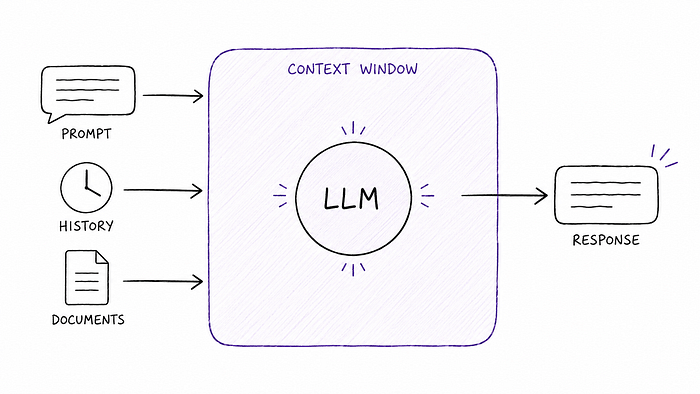
Why does this matter? Because nearly everything we'll discuss exists, in part, to work around the constraints that this architecture creates, or to extend what the model can do within those constraints.
Tools
Out of the box, an LLM can only generate output from information that is available in its context window. It cannot look something up, run a calculation, send an email, or do anything that requires interacting with the outside world. It can only work with what's inside its context window.
Tools are how we adapt to that limitation. A tool is a capability that we expose to the model, something it can invoke in order to get information or take an action that it couldn't otherwise access. This can be pretty much anything you could hook an ordinary application up to, such as:
- A web search tool
- A database lookup
- A calendar API
- A code execution environment
Each of those, when provided to an LLM, is a tool.
Strictly speaking, however, the model doesn't directly execute the tool. What the model does is request that a tool be used. It effectively says, "I'd like to call the search_web function with the argument 'latest Fed rate decision'." Something else — the application or framework surrounding the model — intercepts that request, actually executes the tool, and feeds the result back into the model's context window. The model then continues from there.
Probably the most common way LLMs leverage tools is via function calling (sometimes called tool use). Function calling is the protocol by which a model signals its intent to invoke a tool, by specifying which tool and with what arguments. When we say a model "supports function calling," we mean it has been trained to produce these structured requests reliably, in a format that the surrounding system can parse and act on.
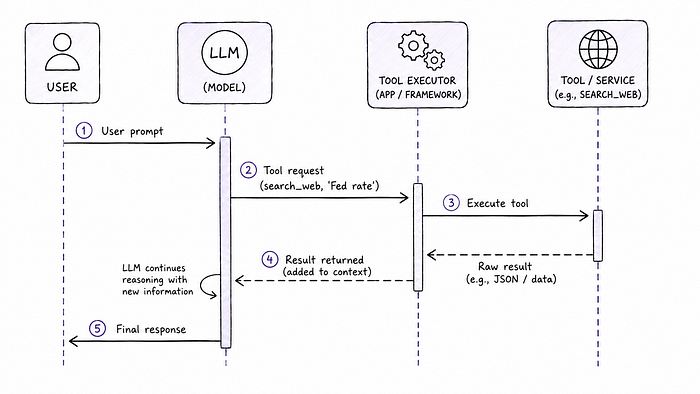
So: tools are the capabilities. Function calling is the mechanism. Both terms get thrown around interchangeably, but they're actually distinct.
A model with a good set of tools is clearly more powerful than one without. But it's still just responding when prompted. It's not deciding what to do next, or figuring out how to break down a complex task. For that, we need something more.
Agents: When the Model Starts Deciding
Initially, the term "agent" was applied to AI applications equipped with tools, and capable of function calling. More recently, however, the term has come to stand for something a bit more.
This differentiation between "a model that has tools" and an "agent" hinges on a key question: who's driving?
When we interact with a standard LLM, even one that's equipped with tools, we are in the driver's seat. We prompt it, and it responds. We look at the response and decide what to do next, and prompt again. The model is reactive.
An agent flips that. In an agentic setup, the model is given a goal (rather than just a prompt) and takes on the responsibility of figuring out how to achieve it. It decides which tools to use, in what order. It evaluates its own intermediate results and decides whether to keep going or adjust course. It loops.
Those familiar with Kubernetes might find some similarities. Much like agents move us from prompting to providing goals, Kubernetes moves us from imperative programming to describing our desired state… and letting the k8s control plane figure out how to make it happen.
So then the agent pattern looks something like this:
- Observe: take in the current state of the world (what's in the context, what tools are available, what's been done so far)
- Reason: decide what to do next
- Act: invoke a tool, or produce output
- Repeat: until the goal is achieved (or a stopping condition is hit)
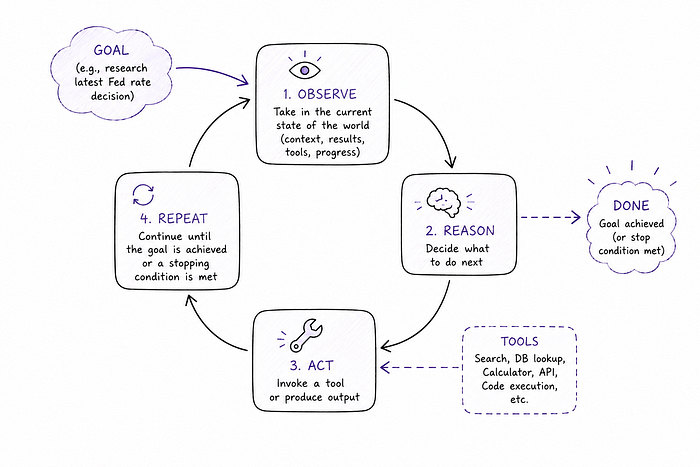
This observe-reason-act loop is what makes an agent an agent. It's not just responding that way a "traditional" LLM-based application would. Rather, it's planning and executing across multiple steps.
Most agentic systems also involve an orchestrator: something that sets up the agent's goal, gives it its tools, monitors its progress, and decides when it's finished. The orchestrator might be another model, a framework (discussed a little later), or custom application code. In simple setups, the model and the orchestrator are practically the same thing. In more complex ones, they're clearly distinct.
The agent pattern is powerful. It's also computationally expensive and can go wrong in interesting ways. Agents can get stuck in loops. They can make poor tool-use decisions. If they hallucinate intermediate results the errors can compound across steps. The loop seems elegant on a whiteboard, but in production, it introduces a whole new category of failure modes that don't exist in simple prompt-response interactions.
Subagents: Divide and Conquer
Sometime after the introduction of agents and their definitional drift from "LLM with tools" to "decision-making orchestrator", we started hearing about "subagents". From the name, we might assume that subagents are smaller versions of normal agents… "baby agents", if you will.
That's misleading. An agent and a subagent are built from the same stuff: the same LLM mechanics, the same observe-reason-act loop, and the same tool access. The difference isn't what they are; rather, it's the role they play in a given system.
If an agent is a model that pursues a goal autonomously, a subagent is an agent that does so at the direction of another agent (or an orchestrator). The top-level agent — sometimes called the primary agent, or just the orchestrator — receives a high-level goal, breaks it into sub-tasks, and delegates each sub-task to a specialized subagent.
This distinction has a practical implication that's easy to miss: the same component can be an agent in one context and a subagent in another, depending on what's above and below it in the hierarchy. "Subagent" isn't a type, but rather, it's a role or position.
Why decompose work into subagents at all? A few reasons:
- Specialization. A subagent can be given a specific set of tools, a specific system prompt, and a narrow scope. A "researcher" subagent might have web search and document retrieval; a "writer" subagent might just have a text editor. Each does one thing well.
- Parallelism. Some tasks can be broken into independent sub-tasks that run concurrently, dramatically reducing total execution time.
- Context management. By farming out sub-tasks, the primary agent avoids filling up its own context window with details that are only relevant to one part of the job. Each subagent gets a fresh context scoped to its specific task.
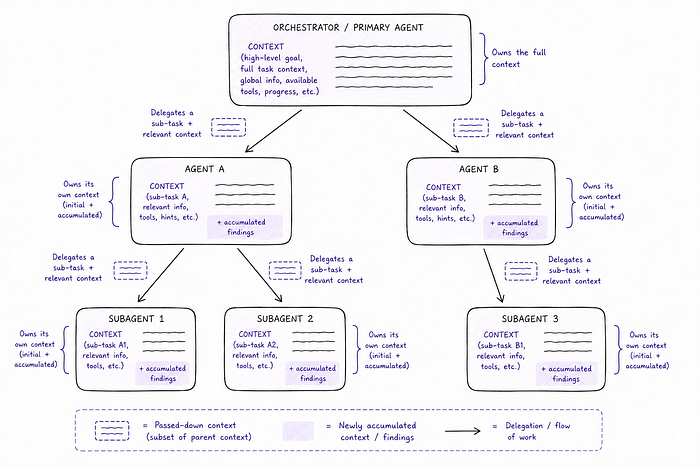
The orchestrator/subagent distinction can feel a bit like "turtles all the way down." And it kind of is. There's no hard rule about how many levels of delegation are too many. In practice, most real-world agentic systems are shallow (one orchestrator, a handful of subagents), because deep hierarchies get hard to debug and reason about quickly.
One final clarification: the term "agent" is sometimes used loosely to describe any LLM-powered component in a system, including what we'd more precisely call subagents. Like a lot of GenAI terminology, the definitions are still settling. When in doubt, the useful question is: what is this thing's scope, who gave it its goal, and what tools does it have?
Orchestration Frameworks
Once we understand agents and subagents, a natural next question arises: how do we actually build all of this? Writing an agent loop from scratch isn't impossible, but it can involve a lot of plumbing: managing state, routing tool calls, handling errors, coordinating multiple agents, keeping track of what's been done, and so on. It's the kind of work that's tedious to write and painful to debug.
That's the gap that orchestration frameworks fill.
Frameworks like LangGraph, CrewAI, and LlamaIndex provide pre-built primitives for the common problems in agentic systems: the agent loop itself, tool registration and routing, memory and state management, multi-agent coordination, and observability (so you can actually see what your agents are doing). Instead of writing all of that from scratch, we start from a foundation and build on top of it.
LangGraph has become a popular choice for complex agentic workflows. Its core idea is that agent behavior is best modeled as a graph. Nodes represent steps (a reasoning step, a tool call, a decision), and edges represent transitions between them. Some edges are fixed; others are conditional ("if the tool call failed, go to the error-handling node; otherwise, proceed"). This makes LangGraph particularly good at workflows that have real branching logic, loops, and failure recovery paths. If you find yourself mentally sketching a flowchart when designing an agent, LangGraph will feel natural. You can implement almost exactly what you drew.
CrewAI takes a different philosophical approach. Where LangGraph thinks in graphs, CrewAI thinks in teams. You define agents as role-holders (a "Researcher" agent, a "Writer" agent, and a "Reviewer" agent, for example) and assign them tasks. CrewAI handles the coordination: who gets what task, in what order, and how results get passed between agents. It's a higher level of abstraction than LangGraph, which means less control but less boilerplate. For multi-agent workflows where the roles are clear and the coordination logic is relatively simple, CrewAI can get something working fast.
LlamaIndex started life as a RAG framework; that is, a toolkit for ingesting, indexing, and querying documents. But it has since expanded to support agent workflows as well. It remains a strong choice when data retrieval is at the center of what your agent does. If you're building a knowledge assistant, a document Q&A system, or anything where the agent needs to reason over large amounts of external data, LlamaIndex's retrieval primitives are hard to beat.
Three frameworks, three philosophies. LangGraph for control, CrewAI for collaboration, LlamaIndex for knowledge. They're not mutually exclusive; teams often combine them.
Do We Even Need a Framework?
As useful as they are, orchestration frameworks do not come without cost.
The abstraction they provide is also the thing that can make them frustrating. When something goes wrong inside a LangGraph graph or a CrewAI crew, the debugging experience can be disorienting. You're several layers removed from the actual LLM calls, and tracing a failure through multiple nodes or agents takes real effort. Frameworks also add dependencies. The LangGraph API you're building against today might look quite different a year from now, and keeping pace with a fast-moving framework while also building a product is a real cost.
So there is a case for going frameworkless. If our agentic workflow is simple enough — say, a single agent with a handful of tools and a clear loop — writing the orchestration logic yourself gives you full visibility into exactly what's happening. It's more code, for sure. But every line of it is yours (or at least, your LLM's).
If our workflow has significant branching logic, multiple specialized agents, or needs robust error handling and retry behavior, we would strongly consider a framework. But if it's a single agent doing a linear series of steps, we might be better off keeping it simple and rolling our own.
MCP Servers: A Standard for Plugging Things In
MCP stands for Model Context Protocol. It's an open specification, introduced by Anthropic, for how tools and data sources expose themselves to AI models and agents. The goal is this: instead of every developer building their own one-off integrations between models and external services, everyone speaks the same language.
Consider something like USB. Before USB, every peripheral had its own connector, its own driver, its own installation ritual. USB didn't replace the peripherals; instead, it standardized how they plug in. MCP does something similar for the AI world. An MCP server is a service that exposes capabilities in a common format that any MCP-compatible client (model, agent, or framework) can discover and invoke.
This is useful when you're connecting to something external, such as another company's API, a cloud service, or a database that lives somewhere else. Writing a custom integration every time is tedious and brittle. An MCP server lets you write that integration once, in a format everyone agrees on, and reuse it across different models and contexts.
The Local MCP Detour
Once MCP was released, developers started using it enthusiastically. Soon, they weren't just using it to connect to remote services. They started spinning up MCP servers locally, on their own machines, to expose simple local capabilities: "list the files in this directory," "run this shell command," "read this config file." Moreover, products such as Claude Desktop began allowing users to connect their own locally-running MCP servers as tools, simply by editing a JSON config file.
But at some point, folks started taking a step back and asking: why?
It's a valid question. If what we need is for an agent to read a local file or run a shell command, spinning up an entire service seems rather overkill, especially when we could just give the agent access to a bash shell. In fact, many agentic frameworks do exactly this. They give the model a bash tool, and the model runs its own shell commands directly. It's simpler, with less infrastructure. And there's no server to configure or keep running.
Here's a rough way to think about it:
- We should use bash (or direct tool execution) when we're doing local, ad-hoc operations, such as reading files, running scripts, or checking system state. It's simpler, faster to set up, less resource-intensive, and there's less to go wrong.
- We should consider using a local MCP server when we want consistency, structure, and reusability; that is, when we're building a tool that multiple agents or applications will use, and we want them all to interact with it the same way.
- We should also consider using a local MCP server when we want to plug one into a desktop AI application that supports local MCP servers.
- We should use a remote MCP server when we're connecting to something that actually lives elsewhere: somebody else's API, a service our company runs in the cloud, or really anything that can't be "just run locally." Here, MCP earns its keep. We can't feasibly replace a remote service with a bash script.
MCP is a protocol, not a requirement. On the plus side, it standardizes metadata and schemas, and can enforce permissions and auth. And as a protocol, it provides "plug and play" integration with most local AI tools.
But for local operations, bash or equivalent tool execution is often simpler and equally effective. As soon as you need standardization, reuse, or a connection to a remote service, MCP starts earning its place.
What About RAG?
Let's pause for a moment on a concept that often gets lumped in with agents and tools, but is really its own thing: Retrieval-Augmented Generation, or RAG.
Here's the core distinction: tools extend what a model can do. RAG extends what a model knows.
Remember the context window? One of its limitations is that it's finite. An LLM's training knowledge also has a cutoff date; the model doesn't know about things that happened after it was trained. Moreover, depending on the application we're building, the model will not have the specific internal documents, customer records, or proprietary data we need it to reason about.
RAG is the pattern we use to address this. Before (or during) the model's response, we retrieve relevant content from some external knowledge base (a vector database, a document store, a search index) and inject that content into the context window. The model then reasons over both its training knowledge and the retrieved content.
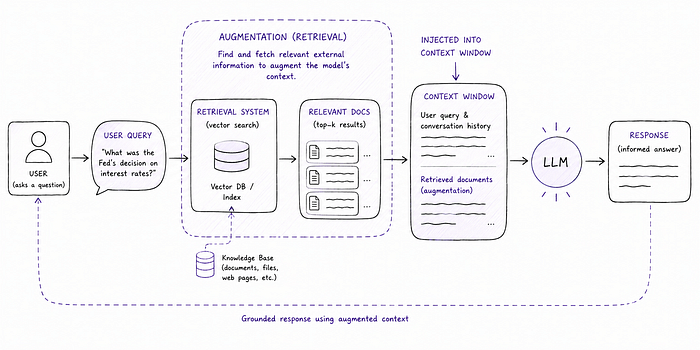
It's a powerful pattern. It's also often confused with tool use, because both involve bringing external information into the model's reasoning. The key difference is when and how that information is fetched. With a tool, the model decides during its reasoning that it needs to fetch something, and requests it. With a pure RAG system, the retrieval happens as part of the pipeline before the model's reasoning. It's more automatic, and less decision-driven.
In practice nowadays, many systems combine both. An agent might have a RAG-based knowledge retrieval tool, in which case the distinction between the two patterns starts to blur. This is exactly the kind of overlap that makes GenAI terminology tricky. Neither term is wrong; they're describing the same system from different angles.
RAG deserves a full article of its own (and plenty such articles exist). For now, just know where it sits on the map: it's about knowledge and memory, not capability and action.
From Prompts to Skills: The User-Facing Layer
Everything we've discussed so far has been about the underlying machinery: models, tools, agents, protocols, frameworks. But there's another layer worth understanding: the features that AI platforms have built to make this stuff reusable and accessible to everyday users.
To understand why those features exist, it helps to trace how we got here.
The Prompt Engineering Arc
When we first started working with LLMs, the interaction was simple: type something, get a response. Very quickly, though, we learned that how we wrote the prompt mattered enormously. Providing examples, specifying the tone, giving the model a role ("you are a superlative expert in…"), and including supporting documents became vital parts of successful prompting. The discipline of getting good results through careful prompt construction became known as prompt engineering.
And once we'd engineered a good prompt, one that reliably produced the output you wanted, a natural problem arose: how do we reuse it?
Early solutions were improvised. Google Docs folders full of copyable-and-pasteable prompt templates. Notion pages. Bespoke internal wikis. Some people built their own little prompt libraries, hand-rolled HTML pages or spreadsheets, just to keep their best prompts organized and findable.
This worked, sort of. But it was friction-heavy. And it didn't solve the deeper problem: a great prompt often depends on context — supporting documents, examples of your own work, background information — that also needs to travel with it.
Platform-Native Solutions
Eventually, the major AI platforms responded by building this capability directly into their products. The implementations differ in interesting ways, and understanding those differences actually matters when deciding which tool to reach for.
Claude Projects function as persistent workspaces. A Project holds a set of instructions (essentially a standing system prompt), plus a collection of files (for example, documents, examples, reference material) that Claude keeps in context across every conversation within that Project. If we're using Claude to review code in a specific codebase, or to write in a particular style informed by examples of your past work, a Project lets us set that context once and not repeat it every session. Within a Project, conversations are scoped and searchable.
Claude Skills go a level further in a different direction. A Skill is a SKILL.md markdown file which contains structured instructions for how Claude should handle a specific task. Skills are file-based and portable: the same skill file works in Claude.ai, in Claude Desktop, and via the API, without modification. The underlying format — a folder containing a SKILL.md file with metadata and instructions — has been formalized as Agent Skills, an open standard originally developed by Anthropic and now adopted across a growing number of agent tools and platforms. The result is that a well-written Skill is a reusable, shareable, version-controllable artifact, something that is more akin to software than to a sticky note.
Gemini Gems are Google's analogue to a simplified version of Claude Projects: custom AI assistants configured with specific instructions, tone, and behavior. Where Gems distinguish themselves is Google Workspace integration: a Gem can potentially pull context from Gmail, Drive, and Calendar natively, which is a genuine advantage for teams that live in Google's ecosystem. The tradeoff is portability. Gems work in the Gemini web and mobile app, but there's no API access to them (as of early 2026), so at least for the moment, they don't compose well into programmatic workflows.
ChatGPT Custom GPTs are perhaps the most publicly visible of the bunch, largely because OpenAI built a GPT Store: a marketplace where anyone can publish and discover custom GPTs. A Custom GPT is configured with a system prompt, a knowledge base of up to 20 uploaded files, and optionally Actions (which are essentially API integrations that let the GPT call external services). The GPT Store distribution makes Custom GPTs uniquely suited for sharing tools broadly.
NotebookLM is worth discussing separately because it's doing something quite different from the others. Rather than being a configurable AI assistant, it's more of a research tool. You give NotebookLM a set of sources (such as documents, PDFs, YouTube links, web pages), and it builds a knowledge base from them. You can then ask questions grounded strictly in those sources. It will generate summaries, create study guides, and in one of its more talked-about features, convert your sources into a podcast-style audio discussion. NotebookLM isn't trying to be a general-purpose assistant, but rather a source-grounded research and synthesis tool. This may make it a poor substitute for Projects or Skills, but a strong choice for tasks like academic research, competitive analysis, or any situation where "stay grounded in these specific documents" is the priority.
Choosing the Right Tool
So which do we reach for? It depends, naturally, on the job.
If the goal is to encode a repeatable workflow — something we do over and over, with consistent instructions and possibly some reference material — a Project or a Skill is the right fit. Projects are best when the context changes per conversation but the standing instructions don't. Skills are better when the instructions themselves are the reusable artifact and we want portability across environments.
If we're in a Google-first organization and want an assistant that can pull from Drive or Calendar without extra setup, Gems have a real edge.
If we want to share a custom assistant publicly, or discover pre-built ones, the GPT Store gives Custom GPTs a distribution advantage nobody else currently matches.
If we need to quickly build a Q&A system over a specific set of documents without writing any code, NotebookLM is in a category of its own.
One final observation: for developers, the line between "a Skill" and "an agent" starts to blur. A Skill that bundles instructions, examples, and tool configurations is, in some lights, a lightweight agent definition. As these platform features mature, that conceptual overlap is only going to grow.
Building Your Own
Platform-native features — Skills, Projects, Gems, Custom GPTs — cover a lot of ground. But at some point, the platform's guardrails start to chafe. Maybe we need a workflow that's too specific to fit neatly into someone else's product. Maybe we want a UI that's actually designed around how we work, rather than a generic chat interface. Maybe we need integrations, or logic, or memory structures that no off-the-shelf tool supports.
Bespoke Apps
This is where building something custom starts to make sense. And increasingly, it actually is sensible, because AI-assisted development has dramatically compressed the time it takes to go from idea to working application.
I've built a few of these myself. One that I find particularly useful at work is an app for writing technical design documents (TDDs). My team has a template, a style (that we sometimes adhere to), and a set of conventions. I've also accumulated examples of what I consider strong TDDs, including some from other colleagues and a few I've written myself. The app is seeded with all of that: the template, the style examples, and a blank starting point. More importantly, it has tool access, and can explore our GitHub repositories and our internal technical documentation to ground its understanding in the actual codebase and systems it's writing about.
Not long ago, building something like that would have been a real engineering commitment in itself. These days, with AI-assisted development, it's closer to an afternoon's work.
The Far End of the Spectrum: Personal Agent Platforms
If a bespoke app is one step beyond a Skill, tools like OpenClaw are several steps further, representing something qualitatively different.
OpenClaw is an open-source, self-hosted personal agent that runs as a persistent daemon on your own machine. It connects to the chat apps you already use, such as WhatsApp, Telegram, Slack, Discord, or iMessage, so you interact with it the same way you'd message a colleague. Behind the scenes, it has access to your local files, can run shell commands, control a browser, send emails, manage your calendar, and connect to over 50 external integrations. It also maintains persistent memory across conversations, storing context as local Markdown files that you can read, edit, and version-control yourself.
The OpenClaw stack illustrates something important: once you put the pieces together — a capable model, tool access, persistent memory, an agent loop, scheduled triggers — the result starts to feel less like a chatbot and more like a digital coworker.
We should actually dig into that last piece, scheduled triggers. If you're like me, you might have a few questions about that works. When OpenClaw summarizes your emails every morning, or sends you a briefing at 8am, is there something clever happening to keep an AI "awake" and waiting? Not really. The underlying mechanism is about as unglamorous as it gets: a cron job. A conventional scheduler fires at the configured time, which triggers the agent. The agent is instantiated fresh, handed its context ("here are your emails from the last 24 hours", "here are your preferences"), does its work, and exits. The LLM itself is stateless. The models themselves do not persist conversation state between invocations. What persists is the surrounding system: the scheduler, the memory store, the tool integrations.
So "always-on" is more of a UX metaphor than a technical description. The experience feels continuous. The implementation is event-driven infrastructure with an AI in the middle. This means the same pattern works for any trigger, not just timers:
- A new email arriving.
- A GitHub webhook.
- A price alert.
- A calendar event.
Any of these can wake up an agent, hand it context, and let it decide what to do.
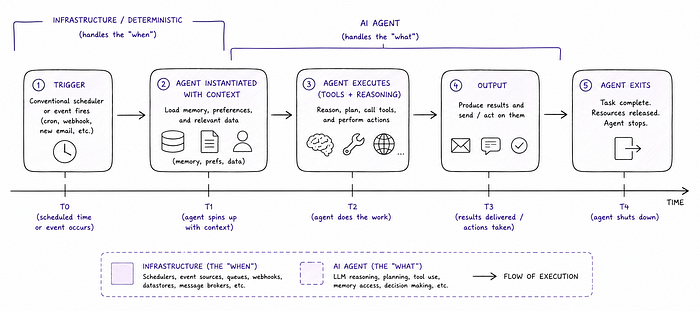
This is a miniature form of the same architecture that powers far more complex systems, such as enterprise workflow automation, background monitoring agents, and CI/CD pipelines with AI-driven decision steps. All of them are variants of the same pattern: deterministic infrastructure deciding when to run something, and an AI agent deciding what to do when it runs.
The Full Map
We've covered a lot of ground. Now let's see how it all sits together.
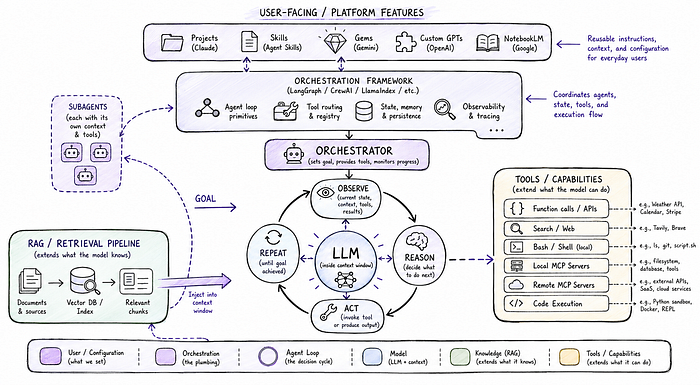
Here's a quick cheat sheet for the concepts we've covered:
- LLM: The model. Predicts tokens. Works within a context window. Everything else is built on top of it.
- Tools: Capabilities exposed to the model, such as search, code execution, APIs, etc. The model requests them; the surrounding system runs them.
- Function calling / tool use: The mechanism by which a model signals that it wants to invoke a tool.
- Agent: A model operating in a loop (observe, reason, act) working towards a goal rather than just responding to a prompt.
- Orchestrator: The thing that sets up and manages an agent (or agents). May itself be a model.
- Subagent: An agent that operates at the direction of a primary agent or orchestrator. Often scoped to a specific sub-task.
- Orchestration framework: A library (LangGraph, CrewAI, LlamaIndex, etc.) that provides pre-built primitives for building agentic systems. Reduces boilerplate; adds abstraction.
- MCP server: A service that exposes tools or data via the shared Model Context Protocol standard. More useful for remote services and shared tool surfaces; bash or direct execution may be simpler for local operations.
- RAG: A pattern for extending the model's knowledge by retrieving and injecting external content into the context window. About what the model knows, not what it can do.
- Projects / Skills / Gems / Custom GPTs: Platform-native features for bundling instructions and context into reusable configurations. The user-facing layer on top of everything else.
- Bespoke AI apps: Custom applications built on top of model APIs, combining purpose-built UIs, tool access, and workflow logic that platform features alone can't provide. More effort than a Skill; increasingly worth it.
- Personal agent platforms (e.g. OpenClaw): Self-hosted, always-available agents with persistent memory, broad integrations, and event/schedule-driven triggers. The full stack, assembled and running, with deterministic infrastructure handling the "when", and AI handling the "what".
Now You Can Read the Map
With all of that said, the terminology in this space is still evolving. Definitions that seem settled today might shift six months from now. Things that were once distinct are converging; patterns that were once fuzzy are sharpening.
What I find interesting, looking at this map as a whole, is how much of parallels "classic" software architecture. An orchestrator delegating to subagents is a coordinator pattern. A tool is just an API call with a standardized interface. RAG is data search and retrieval. MCP is a protocol spec. Frameworks are, well, frameworks. The one thing that doesn't map cleanly onto prior art is the model itself: the fact that the "reasoning" step in the agent loop is handled by something that wasn't explicitly programmed to reason, but learned to.
That's what makes all the scaffolding worth understanding, because the model is the powerful and unpredictable part. Everything around it is our attempt to give that power structure, direction, and guardrails. Knowing the shape of each concept changes how we work with these systems, even if the edges are still a bit fuzzy.
Note: all uses of the em-dash in this article are my own.
References
- Anthropic MCP Documentation
- OpenAI Function Calling Guide
- LangGraph Documentation
- CrewAI Documentation
- LlamaIndex Documentation
- Lewis et al., "Retrieval-Augmented Generation for Knowledge-Intensive NLP Tasks" (2020)
Find this story useful? Want to read more? Just subscribe here to get my latest stories sent directly to your inbox.
You can also support me and my writing — and get access to an unlimited number of stories — by becoming a Medium member today.