What if you could get 80% of the dbt Cloud experience while keeping everything self-hosted? That's the question that started a side project I've been building using React, FastAPI, dbt Core, and Prefect.
The first time I used dbt when coming from the casual Script to Alter SQL SERVER Stack I was amazed. Soft subtle things like source control and dbt tests saved my life. I was convinced it was the future and by no doubt it became industry standard. The company I work for is a partner and by dbt Labs own words "our biggest competitor is the opensource core offering"
That got me thinking…
The entire engine is open source and free to use and when comparing Core to Cloud it boils down to a Web based IDE, Orchestration and Mesh. There are obviously more features and benefits but those are the ones I see most used.
My thinking was, can we create a cloud experience for developers who are not as skilled with the cli and having to deal with VS Code Extensions. Even though I am of the opinion that a GUI just clutters and experience and if there is a cli tool I will use that. BUT… I started off my journey in data with Microsoft SQL and ONLY used the GUI masked as an IDE called SSMS. So it does have appeal.
The Goal
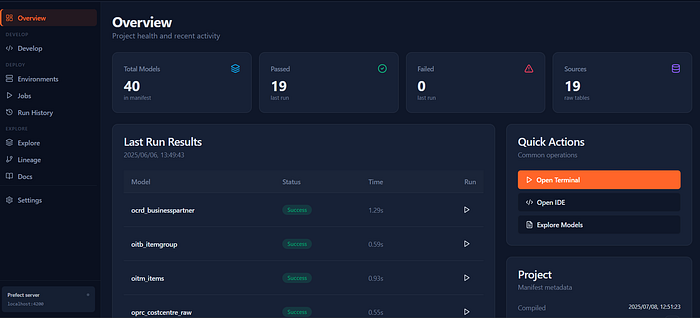
The objective is to build a front end that mimics dbt Cloud, not replace. It should have the following by utilizing the shell commands and the self-hosted Prefect API for the Orchestration: - Project Overview: Real-time project health dashboard with stats and recent activity
- Job Management: Create and schedule dbt jobs with different configurations
- Run History: View past job executions with logs and artifacts
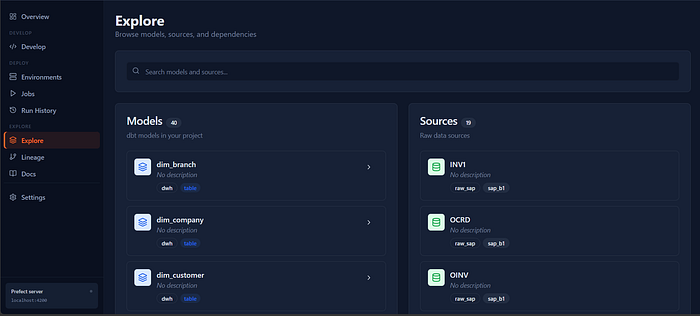
- Model Exploration: Browse dbt project structures including models and sources
- Environment Management: Configure multiple dbt environments (dev, staging, prod)
- Development Tools: In-browser editor with terminal for local development
- Settings: Configure application preferences and system settings
I am not a software developer by trade but I enjoy projects like this where there are no tickets or story point and I can build what I vision.
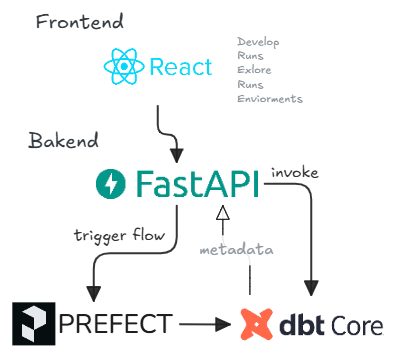
The Tech Stack to juice up dbt Core is a react front end with tailwind (and Shadcn since I used it before). And FastAPI for the backend.
Starting with the Hardest Part
I started with the Develop Page, since that seemed the most complicated at the time due to a, having a browser IDE and git logic along with the actual editor.
After figuring out how to execute shell commands through FastAPI it felt like I unlocked the entire idea and I was cooking.
I started with the snippet:
args = ["dbt"] + shlex.split(body.command)It seemed to be fine for executing commands locally but apparently its considered a "command-injection footgun". Similar to sql promt injection so I ended up with my attempt to make it safe by determining what actually is allowed to run:
ALLOWED_DBT = {"run", "test", "build", "seed", "snapshot", "compile", "docs", "ls", "debug"}

def safe_dbt_args(command: str) -> list[str]:
    parts = shlex.split(command)
    if not parts or parts[0] not in ALLOWED_DBT:
        raise HTTPException(400, f"dbt subcommand not allowed: {parts[:1]}")
    return ["dbt"] + parts
Now I can sleep safe.
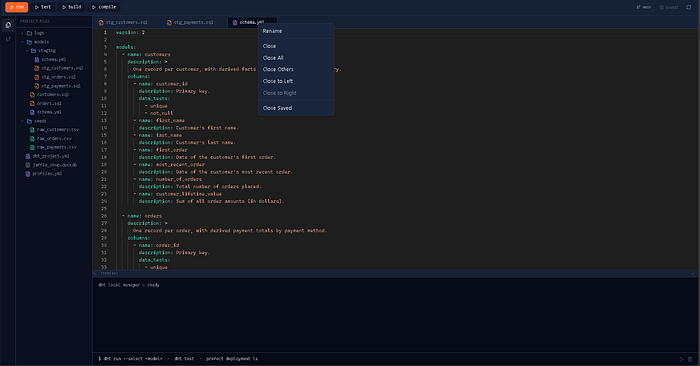
I ended up using monaco-editor for the actual editor after trying and failing to build my own version of it and this was the end result.
Now I have a working project based
- File Navigation
- Code Editor
- Git and Version Control
- Terminal Access with dbt commands
Building the Explore Experience + Environments/Overview
These three pages are mostly parsing schema.yml, dbt_project.yml, and profiles.yml and presenting it nicely and to satisfaction, but not where the difficulty was. In addition I embedded the generated dbt Docs.
If I'm being completely honest, Explore currently feels a little bloated with the dbt Docs being embedded. At some point I'll probably add a setting that allows users to collapse or disable the embedded documentation view.
It's still sitting in the perpetual backlog.
The Prefect Breakthrough
The real challenge was trying to integrate the Orchestration element from Prefect.
My initial approach was exactly what had worked for dbt: execute CLI commands through the API and build the experience around that.
After spending far too long fighting with this approach, I finally did what I should have done from the beginning.
I read the documentation.
While exploring Prefect's documentation, I discovered the self-hosted OpenAPI specification.
docs.prefect.io/v3/api-ref/rest-api/server/schema.json
This was another one of those breakthrough moments.
Before (the CLI-wrapping dead end): parsing human-readable stdout for status.
# Fragile: scrape the CLI's text output and hope the format never changes
proc = subprocess.run(["prefect", "flow-run", "ls"], capture_output=True, text=True)
# ...now regex your way to a run status. This was the trap.
After (API-first): one POST to the self-hosted OpenAPI endpoint, structured JSON back.
async def _prefect_post(path: str, body: dict | None = None):
    s = _load_config().settings
    async with httpx.AsyncClient(timeout=s.http_timeout_s) as client:
        resp = await client.post(f"{s.prefect_api_url}{path}", json=body or {})
        resp.raise_for_status()
        return resp.json()

@app.get("/api/prefect/flow-runs")
async def list_flow_runs():
    limit = _load_config().settings.prefect_query_limit
    return await _prefect_post(
        "/flow_runs/filter",
        {"sort": "EXPECTED_START_TIME_DESC", "limit": limit},
    )
APIs are built for programs to communicate with software and cli for humans. Lesson learnt.
The architecture immediately became cleaner:
- Query flow runs directly
- Retrieve logs and execution history
- Manage deployments
- Trigger pipelines
- Monitor execution status in real time
Once I switched to the API-first approach, progress accelerated significantly.
After some trial and error, I ended up with working Runs and Jobs screens connected directly to Prefect.
The user experience was dramatically better than anything I had achieved through CLI wrappers.
Current State
At this point our platform included:
Develop
An in-browser development experience powered by Monaco Editor with terminal access and dbt execution.
Explore
Model and source exploration generated from project metadata and dbt documentation
Overview
Project statistics, configuration summaries, and environment information.
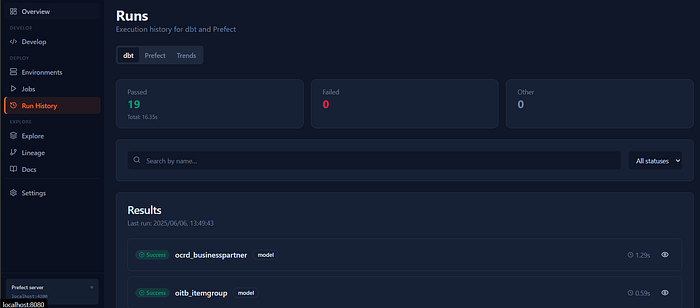
Runs
Execution history, logs, and artifacts surfaced through Prefect.
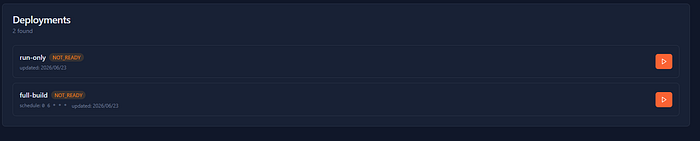
Jobs
Job creation, scheduling, and deployment management.
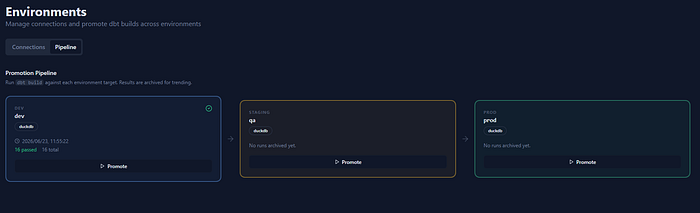
Environments
Configuration management across multiple deployment targets.
What's Next
I'm currently working on adding CI capabilities.
The end goal is to:
- Trigger GitHub Actions on pull requests and merges
- Automatically execute validation workflows
- Associate branches with specific environments
- Promote changes through development, staging, and production
The Real Test
The real question isn't whether I can recreate dbt Cloud but rather if I can use the app day without reaching for VS Code or the terminal.
My plan is to use it for an actual dbt project and keep track of every time I fall back to existing tools.
Whenever that happens, I'll ask two questions:
- Why did I leave the platform?
- What feature would have prevented it?
If I can systematically eliminate those moments, I might end up with something genuinely useful.
At the very least, it's been a fun reminder that some of the best projects start with a simple question and a willingness to see where it leads..